

Most ecommerce managers believe UX is just about making sites look pretty. That’s a costly mistake. Real UX combines design with strategic functionality to drive conversions, reduce cart abandonment, and build customer loyalty. When you integrate smart UX with email marketing automation, you create a growth engine that converts browsers into buyers and one-time customers into repeat purchasers. This article reveals how effective UX design transforms your ecommerce performance and shows you practical ways to measure and optimize every touchpoint in your customer journey.
Table of Contents
- Key takeaways
- Understanding the role of UX in ecommerce
- Key UX components that drive ecommerce success
- Integrating UX with email marketing to boost ecommerce growth
- Measuring and optimizing UX for continuous ecommerce improvement
- Enhance your ecommerce UX and marketing with Swyft Interactive
- FAQ
Key Takeaways
| Point | Details |
|---|---|
| UX drives conversions | Real UX combines design and strategic functionality to drive conversions, reduce cart abandonment, and build customer loyalty. |
| UX and email integration | Integrating smart UX with email marketing automation creates a growth engine that converts browsers into buyers and turns first time buyers into repeat customers. |
| Mobile first design | Prioritize mobile first UX since most ecommerce traffic comes from mobile devices and test features on mobile before desktop to ensure seamless experiences. |
| Fast navigation and load times | Fast page load times, intuitive navigation, and accessible design keep users moving toward checkout. |
Understanding the role of UX in ecommerce
UX in ecommerce goes far beyond choosing colors and fonts. It encompasses every interaction a customer has with your store, from the first click to post-purchase follow-up. True UX includes usability, accessibility, information architecture, and the emotional response your site triggers. When shoppers can find products quickly, navigate without confusion, and complete purchases effortlessly, they trust your brand and return.
Many store owners underinvest in UX because they see it as a nice-to-have rather than a revenue driver. This misconception costs them dearly. UX significantly impacts ecommerce conversion rates and customer satisfaction, directly affecting your bottom line. Poor navigation frustrates users, slow load times send them to competitors, and clunky checkout processes abandon carts.
Think of UX as the foundation of your ecommerce strategy. Without it, even the best products and marketing campaigns struggle to convert. Your site architecture should guide customers naturally toward purchase decisions, removing obstacles and answering questions before they arise. Accessibility ensures everyone can shop comfortably, expanding your market and demonstrating brand values.
Common UX misconceptions include believing mobile optimization is optional, assuming customers will figure out complex interfaces, or thinking UX improvements require massive budgets. Reality check: most ecommerce traffic now comes from mobile devices, users abandon confusing sites within seconds, and many high-impact UX fixes cost little to implement.
Pro Tip: Prioritize mobile-first UX design since the majority of ecommerce traffic originates from smartphones and tablets. Test every feature on mobile devices before desktop to ensure seamless experiences where your customers actually shop.
Key UX elements that separate winning stores from struggling ones:
- Clear visual hierarchy that guides eyes to important information
- Intuitive navigation with logical category structures
- Fast load times across all devices and connection speeds
- Accessible design that works for users with disabilities
- Consistent branding and interaction patterns throughout the site
Key UX components that drive ecommerce success
Several specific UX factors directly influence whether visitors become customers. Site navigation tops the list. When shoppers can’t find products quickly, they leave. Your category structure should reflect how customers think, not how you organize inventory. Search functionality must handle misspellings, synonyms, and natural language queries. Filters should let users narrow options without overwhelming them.
Page load speed makes or breaks sales. Research shows that even one-second delays significantly increase bounce rates and decrease conversions. Mobile users expect instant responses. Compress images, minimize code, use content delivery networks, and eliminate unnecessary scripts. Every millisecond counts when competing for attention.

Checkout process design determines whether full carts convert to completed orders. Optimizing checkout UX reduces cart abandonment and boosts revenues by removing friction at the critical moment. Guest checkout options, progress indicators, multiple payment methods, and clear shipping information all improve completion rates. Auto-fill capabilities and saved payment details speed returns.
Personalization transforms generic browsing into tailored shopping experiences. Personalization can increase ecommerce conversions by up to 80% by showing relevant products, customized recommendations, and targeted messaging based on behavior and preferences. Dynamic content adapts to individual shoppers, making each visit feel curated.
| UX Component | Impact on Conversion | Impact on Retention |
|---|---|---|
| Intuitive Navigation | High – reduces search time | Medium – improves return visits |
| Fast Load Speed | Very High – prevents bounces | High – encourages exploration |
| Streamlined Checkout | Very High – completes purchases | Medium – reduces friction |
| Personalization | High – increases relevance | Very High – builds loyalty |
| Mobile Optimization | Very High – captures majority traffic | High – enables anywhere shopping |
Product pages need strategic UX too. High-quality images from multiple angles, zoom functionality, detailed descriptions, size guides, customer reviews, and clear calls to action all contribute to purchase confidence. Videos demonstrating products in use answer questions and reduce returns.
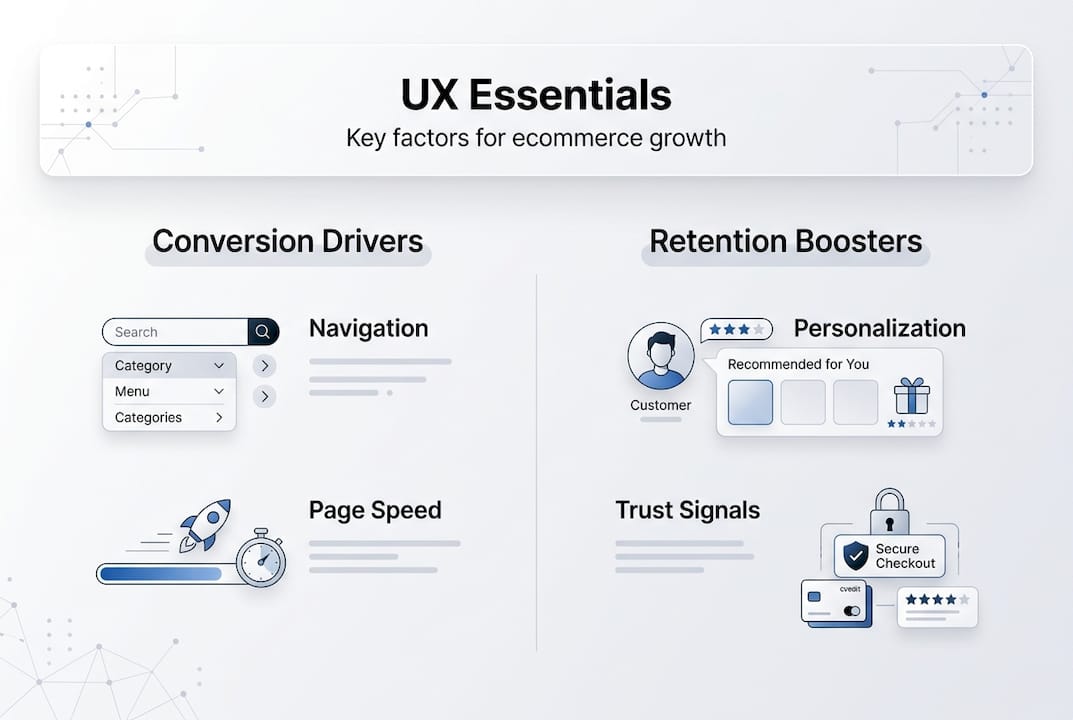
Trust signals throughout your site reassure hesitant buyers. Security badges, clear return policies, customer testimonials, and transparent shipping costs build credibility. Display contact information prominently so customers know real people stand behind your store.
Pro Tip: Use A/B testing to refine checkout flows continuously. Test one element at a time like button colors, form field arrangements, or shipping option presentations to identify exactly which changes improve completion rates without guessing.
Integrating UX with email marketing to boost ecommerce growth
Great UX doesn’t stop at your website boundaries. The most successful ecommerce brands create seamless experiences across every customer touchpoint, especially email. When your site UX aligns with email marketing strategies, you amplify engagement and revenue from both channels. Consistency builds trust and makes every interaction feel like part of a cohesive journey.
Email automation paired with optimized UX workflows drives higher ecommerce revenue by reducing friction at critical moments. Abandoned cart emails work better when checkout UX is already simplified. Browse abandonment campaigns convert more when product pages load instantly and display compelling information. Post-purchase emails delight customers when order tracking and account management UX makes follow-up actions effortless.
Improved site UX directly increases email signup rates. When newsletter popups appear at natural pauses in browsing, offer genuine value, and don’t obstruct content, users willingly subscribe. Clear value propositions and simple forms remove barriers. Once subscribed, email click-through rates improve when landing pages match campaign messaging and load quickly.
Here’s how to align UX and email marketing workflows for maximum impact:
- Map complete customer journeys identifying every touchpoint from awareness through advocacy
- Ensure visual consistency between email designs and website branding so transitions feel natural
- Optimize landing pages for email traffic with fast load times and messaging that continues email narratives
- Use behavioral triggers based on site interactions to send timely, relevant email campaigns
- Test mobile experiences for both emails and linked pages since most opens happen on phones
- Personalize email content using browsing history and purchase data captured through site interactions
- Create feedback loops where email responses inform site UX improvements and vice versa
Email content should reflect your site’s UX philosophy. If your website prioritizes simplicity and clarity, emails should too. Consistent tone, visual style, and interaction patterns across channels reinforce brand identity and make customers comfortable. When users know what to expect, they engage more confidently.
“Brands that integrate UX optimization with email automation see up to 40% higher revenue per customer compared to those treating channels separately. The synergy creates compounding returns as each improvement enhances the other’s effectiveness.”
Consider how ecommerce marketing strategies work together. Your site UX captures attention and builds initial interest. Email marketing nurtures relationships and drives repeat visits. When both excel and reinforce each other, customer lifetime value soars. Segment email lists based on site behavior to send hyper-relevant campaigns that feel personally crafted.
Measuring and optimizing UX for continuous ecommerce improvement
You can’t improve what you don’t measure. Tracking UX performance through specific metrics reveals exactly where customers struggle and which improvements deliver results. Start with key performance indicators that directly tie to business outcomes. Bounce rate shows how many visitors leave immediately, signaling navigation or relevance problems. Conversion rate tracks the percentage completing desired actions. Session duration indicates engagement levels.
Customer feedback channels provide qualitative insights that numbers alone miss. Post-purchase surveys ask about shopping experiences. On-site feedback widgets let users report issues in real time. Usability testing with real customers uncovers friction points you’d never notice internally. Reviews often mention UX frustrations alongside product opinions.
Tracking user engagement and feedback is essential for informed UX optimization because it reveals the why behind the numbers. Analytics show what happens, but customer input explains motivations and pain points. Combine both for complete understanding.
| Tool | Primary Use | Best For | Price Range |
|---|---|---|---|
| Google Analytics | Traffic and behavior analysis | Understanding user flows and conversion funnels | Free |
| Hotjar | Heatmaps and session recordings | Visualizing where users click and scroll | $39-$589/month |
| Optimizely | A/B testing and experimentation | Testing UX variations scientifically | Custom pricing |
| UserTesting | Qualitative user feedback | Getting real customer perspectives | $49+/test |
| Crazy Egg | Visual analytics and testing | Quick heatmap insights and simple tests | $29-$249/month |
Actionable tips for iterative UX improvements:
- Set baseline metrics before changes so you can measure impact accurately
- Focus on high-traffic pages first where improvements affect the most users
- Fix obvious problems like broken links and slow pages before sophisticated optimizations
- Prioritize mobile experience since it drives majority traffic and conversions
- Test changes with small user segments before full rollout to minimize risk
- Document what you learn from each test to build institutional knowledge
- Review analytics monthly to spot emerging trends and new opportunities
Quantitative data tells you what’s happening. Page load times, cart abandonment rates, and conversion funnels provide objective measurements. Qualitative insights explain why it’s happening. Customer interviews, support ticket analysis, and usability studies reveal motivations and frustrations. The most effective UX optimization combines both perspectives.
Create a continuous improvement cycle. Analyze data to identify problems, hypothesize solutions, test changes, measure results, and refine based on outcomes. Small, frequent improvements compound over time into dramatic performance gains. Don’t wait for perfect solutions. Ship incremental enhancements and learn from real user responses.
Enhance your ecommerce UX and marketing with Swyft Interactive
Transforming UX insights into revenue growth requires expertise in both design and ecommerce marketing. Swyft Interactive specializes in creating high-converting websites that integrate seamlessly with sophisticated email automation strategies. We don’t just make sites look good. We build complete growth engines that turn visitors into loyal customers through strategic UX improvements and personalized marketing campaigns.
Our approach combines fast-loading, mobile-optimized ecommerce websites with Klaviyo automation that nurtures every customer relationship. We’ve helped dozens of online stores dramatically improve conversions, reduce cart abandonment, and increase customer lifetime value through data-driven UX enhancements and targeted email workflows. Check out our ecommerce website checklist with Klaviyo automation to see how we integrate these elements.
Whether you need a complete site redesign, checkout optimization, or ecommerce growth strategy automation that scales with your business, we deliver measurable results. Our team analyzes your current performance, identifies high-impact improvements, and implements solutions that drive immediate and long-term growth. Explore our email marketing automation guide for ecommerce to discover how we help brands like yours thrive.
FAQ
What is the main difference between UX and UI in ecommerce?
UX encompasses the entire customer experience including navigation, usability, accessibility, and how users feel throughout their journey. UI focuses specifically on visual elements like colors, typography, buttons, and interface aesthetics. Both matter, but UX addresses broader customer satisfaction and business outcomes while UI handles the look and feel of individual touchpoints. Great ecommerce sites excel at both, creating beautiful interfaces that also function intuitively.
How does improving UX reduce cart abandonment?
Complicated checkout processes frustrate customers and cause them to abandon purchases before completion. Slow page loads, confusing form fields, unexpected costs, and limited payment options all create friction at the critical conversion moment. Simplifying checkout steps, optimizing the checkout experience, speeding load times, and providing clear progress indicators remove these obstacles. When completing a purchase feels effortless, more customers follow through.
Can integrating UX and email marketing really increase ecommerce revenue?
Absolutely. Consistent UX across your website and email channels builds trust and reinforces brand identity. When customers receive emails that match your site’s look and feel, then land on pages that load quickly and deliver on email promises, they engage more confidently. Combined UX and email automation strategies significantly boost ecommerce revenue by creating seamless journeys that convert initial interest into purchases and repeat business. The synergy amplifies results from both channels.
How quickly can UX improvements impact ecommerce performance?
Some UX fixes deliver immediate results. Speeding up page load times, simplifying navigation, or streamlining checkout can boost conversions within days. Other improvements like comprehensive personalization or complete site redesigns take longer to implement but offer sustained gains. Start with quick wins that remove obvious friction, then tackle more complex optimizations. Most stores see measurable improvements within the first month of focused UX enhancements.