The email list segmentation process is a short, repeatable workflow: set a revenue goal, audit your subscriber data, define 3–5 dynamic segment rules, build those segments in your ESP, write targeted messages for each, automate the flows, add exclusions, and measure against a control. Done right, it replaces one-size-fits-all blasts with targeted email campaigns that reach the right subscriber at the right moment. A skincare brand, for example, can trigger a replenishment email to customers who bought a moisturizer 28 days ago and exclude anyone who purchased in the last seven days — protecting conversion rates while reducing wasted sends. Klaviyo, Mailchimp, Zapier, and Shopify are the most common platforms for implementing this workflow, either natively or through event-based integrations.
Quick-start checklist:
- Set a business goal and primary KPI (revenue per recipient, CTR, conversion rate)
- Audit available data: purchase events, browse behavior, profile fields, preference inputs
- Choose 3–5 revenue-linked segments to build first
- Map events and attributes to segment logic in your ESP
- Build dynamic segments (not static lists)
- Create one message or flow per segment
- Add exclusion rules (recent purchasers, unfulfilled orders)
- QA, send, and measure against a control group
- Iterate monthly
Pro Tip: Before you build a single segment, confirm that your Shopify order events are actually firing into Klaviyo or Mailchimp. Segments built on missing data are worse than no segments at all.
Table of Contents
- What email list segmentation actually means for marketers
- Why segmentation improves engagement, deliverability, and ROI
- The main types of segmentation and which signals to use
- Step-by-step email list segmentation process you can follow today
- High-impact segmentation recipes for ecommerce
- Data sources, integrations, and the ESP setup you need
- How to automate segments and keep them healthy over time
- Which metrics to track and how to test segmentation safely
- Best practices, compliance notes, and common mistakes to avoid
- Preference centers and progressive profiling: a practitioner playbook
- Key Takeaways
- An agency perspective on segmentation that actually ships
- Swyftinteractive’s approach to segmentation for ecommerce brands
- Useful sources
- FAQ
What email list segmentation actually means for marketers
Email list segmentation means splitting your subscriber base into smaller, actionable groups based on data-driven criteria, then messaging each group differently. The operational definition that matters for marketing teams: a segment is a rule set that filters subscribers by signals you already have, such as purchase history, lifecycle stage, or stated preferences, and applies those rules automatically as subscriber data changes.
Two membership models exist. Static segments are snapshots: you filter once, export a list, and it never updates. Dynamic segments re-evaluate membership continuously against live data, so a subscriber who just bought drops out of the “never purchased” segment automatically. For ongoing campaigns, dynamic segments scale better and stay accurate without manual cleanup.
The signals that anchor a segment fall into three categories:
- Zero-party data: what subscribers tell you directly (quiz answers, preference center selections, survey responses)
- First-party behavioral data: what they do on your site and in your emails (purchases, clicks, product views, cart events)
- Profile data: demographic or geographic attributes collected at signup or checkout
Pro Tip: Progressive profiling outperforms long signup forms every time. Ask one high-signal question at signup (“What brings you here today?”) and collect additional attributes over time. Friction at the gate costs you subscribers; a short form gets you in the door.
Why segmentation improves engagement, deliverability, and ROI
Segmentation raises relevance and cuts wasted sends. When subscribers receive messages tied to their actual behavior, click-through rates climb, conversion rates improve, and unsubscribe and complaint rates fall. The inverse is also true: blasting your full list with a promotion that ignores purchase history trains your best customers to ignore you.

Purchase-based segments and RFM (recency, frequency, monetary value) drive more reliable revenue lift than open-based segments, which are increasingly corrupted by Apple Mail Privacy Protection. Brands that still rely on open-and-click “engaged” segments as their primary revenue filter are working with a distorted picture.
Segmentation also protects deliverability. Inbox providers watch complaint rates and engagement signals at the domain level. Sending to disengaged subscribers repeatedly pushes your domain toward the spam folder. Keeping your active segments clean and your inactive subscribers on a suppressed or re-engagement path keeps your sender reputation intact.
Primary KPIs to monitor when you launch segmentation:
- Revenue per recipient (RPR)
- Click-through rate (CTR)
- Conversion rate per segment
- Unsubscribe rate per send
- Spam complaint rate
- Deliverability signals (inbox placement, bounce rate)
The main types of segmentation and which signals to use
Most ecommerce segmentation strategies fall into a handful of categories. The table below maps each type to the concrete signals, example rules, and primary use cases that make them worth building.
| Segment Type | Key Signals | Example Rule | Primary Use Case |
|---|---|---|---|
| Behavioral | Clicks, purchases, site events | Clicked product category link in last 30 days | Category affinity campaigns |
| Lifecycle stage | Order count, signup date, last purchase date | First order placed; no second order in 60 days | First-to-second purchase flow |
| RFM | Recency, frequency, monetary value | Purchased 3+ times, last order within 90 days, AOV above — | VIP and loyalty programs |
| Zero-party preferences | Quiz answers, preference center fields | Selected “skincare” at signup | Interest-matched campaigns |
| Demographic | Age, gender, birthday | Birthday within next 30 days | Birthday offer flows |
| Geographic/locale | Country, state, timezone | Country = United States, state = California | Local promotions, timezone sends |
| Churn risk | Days since last purchase vs. average cadence | No purchase in 90–180 days, previously active buyer | Win-back automations |
| Discount affinity | Coupon usage history | Purchased only with promo code in last 3 orders | Margin-protection segmentation |
| Engagement by click | Email click events (not opens) | Clicked any email link in last 60 days | Active subscriber campaigns |
A few platform notes worth knowing. Klaviyo supports all of these natively, including predictive CLV and churn risk built from historical order data. Mailchimp covers behavioral and demographic segments well but requires more manual setup for RFM. Shopify feeds order and browse events into both platforms through native integrations; Zapier fills the gaps when a custom event or third-party tool needs to push data into your ESP without a direct connector.
Behavioral targeting is the most reliable foundation for ecommerce segments because it reflects what customers actually do, not just who they say they are.
Step-by-step email list segmentation process you can follow today
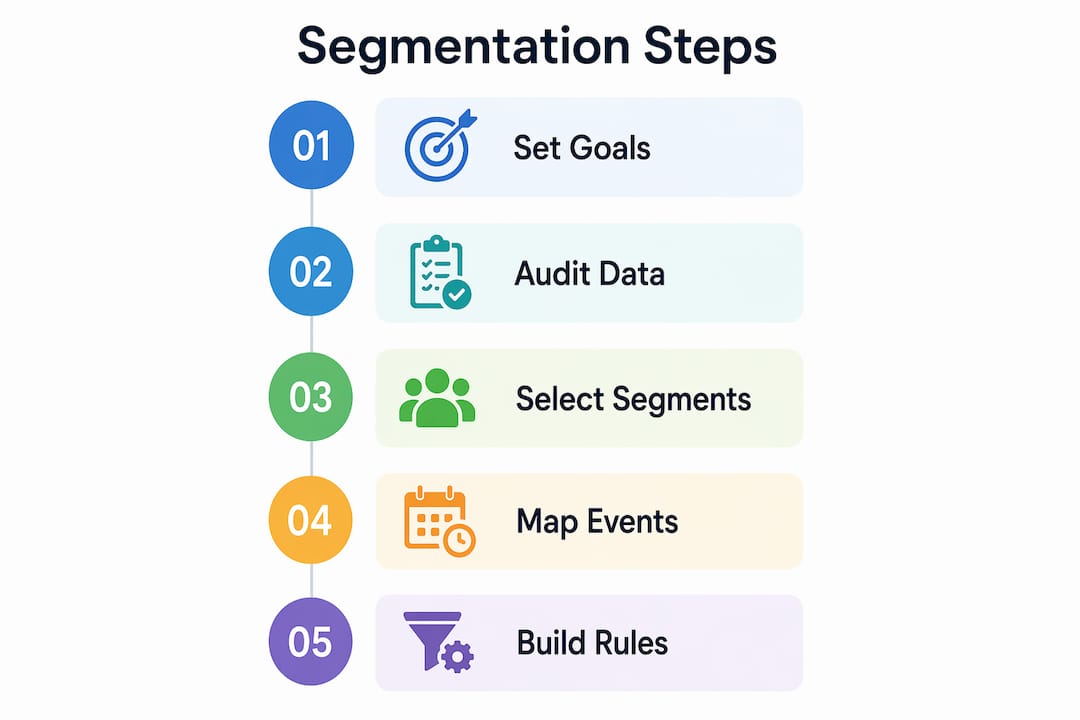
The segmentation process runs in nine steps: goal, data audit, segment selection, logic mapping, build, message creation, exclusions, QA, and iteration. Each step has a clear owner and a realistic timeline.
Step-by-step process:
- Set a business goal and KPI. Pick one primary metric per segment: RPR for VIP flows, conversion rate for abandoned cart, repeat purchase rate for lifecycle. Vague goals produce vague segments.
- Audit available data. Check what events actually fire in your ESP. Confirm Shopify order events, product view events, and profile fields are syncing correctly before you build anything.
- Choose 2–4 revenue-linked segments. Start with 3–5 high-impact segments tied to business outcomes rather than dozens of micro-segments. Abandoned cart, lifecycle stage, VIP, and churn risk are strong starting points for most ecommerce brands.
- Map events and attributes to segment logic. Write out the rule in plain language first: “Subscriber placed an order in the last 90 days AND has placed 3 or more orders total AND has not placed an order in the last 7 days.” Then translate that into your ESP’s filter syntax.
- Build dynamic segments. In Klaviyo, this means using the segment builder with AND/OR logic on event properties and profile attributes. In Mailchimp, use Groups and Tags combined with automation triggers. Dynamic membership updates automatically as data changes.
- Create messages and flows. Write one email or flow per segment. Match the message to the segment’s defining behavior: a VIP gets early access, a lapsed customer gets a re-engagement offer, a first-time buyer gets a trust-building sequence.
- Add exclusion rules. Exclude recent purchasers from promotional sends using a 7–30 day window based on your typical purchase cycle. Also exclude subscribers with unfulfilled orders and anyone who has received more than a set number of emails in the past week.
- QA and send. Send a test to a seed list that includes your major email clients. Check rendering on mobile and desktop. Verify that segment membership counts look right before you hit send.
- Measure and iterate. Compare each segment’s RPR, CTR, and conversion rate against a control group. Run one variable change at a time. Review monthly.
Implementation timeline:
- Day 1: Audit data, confirm event tracking, select 3–5 segments
- Week 1: Build segments, write flows, add exclusions, QA
- Month 1: Send first campaigns, collect baseline metrics, run first A/B test
Ownership typically splits between the email marketing manager (segment logic, copy, QA) and a developer or Shopify admin (event tracking, integration verification). For smaller teams, Zapier can automate the data handoff between Shopify and your ESP without custom code.
Pro Tip: Exclusion rules are as important as inclusion rules. A subscriber who bought yesterday does not need a “don’t forget to buy” email today. Set a post-purchase exclusion window and protect your sender reputation.

High-impact segmentation recipes for ecommerce
These eight recipes cover the segments that move revenue fastest. Each includes the criteria, goal, a sample subject line, and a note on automation type.
-
Abandoned cart (high automation)
Criteria: Added to cart, no purchase, last 24 hours. Goal: recover the sale. Subject line: “You left something behind.” Flow: 3 emails over 72 hours (1 hour, 24 hours, 72 hours). Exclude subscribers who purchased between sends. -
Browse abandonment (high automation)
Criteria: Viewed product page, no add-to-cart, last 48 hours. Goal: move from consideration to purchase. Subject line: “Still thinking it over?” Flow: 2 emails (4 hours, 48 hours). Pair with retargeting workflows for maximum recovery. -
VIP tier (batch campaign)
Criteria: 3+ orders OR lifetime value above your top 10% threshold. Goal: reward loyalty, increase AOV. Subject line: “Early access — just for you.” Cadence: monthly exclusive sends. Exclude from discount-heavy promotional blasts. -
Recent purchaser exclusion (ongoing rule)
Criteria: Purchased within the last 7–30 days (set based on your product cycle). Goal: protect conversion rates and reduce complaint risk. Apply as a suppression rule across all promotional sends, not just one campaign. -
Repeat buyer — second purchase push (high automation)
Criteria: Exactly one order placed, order date 14–21 days ago. Goal: convert first-time buyers into repeat customers. Subject line: “Ready for round two?” Flow: 2 emails with social proof and a relevant cross-sell. -
Category affinity (batch campaign)
Criteria: Purchased from or clicked emails about a specific product category in the last 90 days. Goal: send relevant product launches and restocks. Subject line: “New arrivals in [category].” Cadence: triggered by new product drops. -
Replenishment reminder (high automation)
Criteria: Purchased a consumable product, estimated reorder date approaching (typically 25–30 days post-purchase for a 30-day supply). Goal: capture the reorder before the customer shops elsewhere. Subject line: “Running low?” Flow: 1–2 emails starting 5 days before estimated depletion. -
Win-back for lapsed customers (high automation)
Criteria: No purchase in 90–180 days, previously active buyer. Goal: re-engage before the subscriber goes fully cold. Subject line: “We miss you — here’s something worth coming back for.” Flow: 3 emails over 30 days. If no engagement after the sequence, move to suppression.
Segmentation in ecommerce works best when each recipe has a single clear goal and a defined exit condition — either the subscriber converts and enters a new segment, or they don’t and get suppressed or re-routed.
Data sources, integrations, and the ESP setup you need
Reliable segments depend on reliable data. Before you build anything, map where your subscriber data actually lives and confirm it is syncing into your ESP in a usable format.
Essential data sources:
- Shopify order events (placed, fulfilled, refunded) with product and category metadata
- Product and category view events from your storefront
- Email click events (not opens — see the metrics section for why)
- CRM fields: lifetime value, acquisition source, loyalty tier
- Zero-party inputs: preference center selections, quiz answers, post-purchase survey responses
- Geographic and timezone data from checkout or signup
Integration checklist:
- Connect Shopify to Klaviyo or Mailchimp via native integration and verify that
placed_order,viewed_product, andadded_to_cartevents are firing - Confirm customer properties (email, phone, AOV, order count) are syncing on each event
- Use Zapier to bridge any tool that lacks a native connector — for example, pushing a post-purchase survey response from Typeform into a Klaviyo profile property
- Sync zero-party data in real time into your ESP; preference data that sits in a survey tool and never updates campaign logic breaks the value exchange entirely
Data hygiene checklist:
| Task | Why It Matters | Frequency |
|---|---|---|
| Deduplicate email addresses | Prevents double-sends and inflated segment counts | Monthly |
| Remove role addresses (info@, support@) | Role addresses inflate list size and hurt deliverability | At import |
| Normalize country and timezone fields | Enables accurate geographic segments and send-time optimization | Quarterly |
| Standardize attribute names | Prevents broken segment rules when field names vary | At setup |
| Validate email format | Reduces hard bounces | At signup |
A practical note on retention windows: keep purchase event data for at least 24 months to support RFM calculations. Browse and click events are useful for 90–180 days; beyond that, they rarely improve segment accuracy and can inflate segment sizes with stale signals. The ecommerce website checklist for Klaviyo covers the technical event-tracking setup in detail if you need a step-by-step reference for your Shopify store.
How to automate segments and keep them healthy over time
Dynamic segments are self-maintaining by design: membership updates automatically as subscriber data changes, so a customer who hits your VIP threshold enters the VIP segment without anyone touching a spreadsheet. Static lists, by contrast, go stale the moment a subscriber’s behavior changes. For any segment you plan to use repeatedly, dynamic is the right choice.
Automation pairings that work well:
- Welcome series triggered when a subscriber joins the “new subscriber” segment
- Replenishment flow triggered when a customer’s estimated reorder date falls within the next 7 days
- VIP exclusive flow triggered when a subscriber crosses your AOV or order-count threshold
- Win-back flow triggered when a subscriber enters the “lapsed 90 days” segment
- Sunset flow triggered when a subscriber has not clicked any email in 180 days
Maintenance checklist:
- Monthly: Pull a small random sample from each segment and manually verify that the members actually match the criteria. Segment logic can break silently when event names change or integrations update.
- Quarterly: Full data audit — check event firing rates, deduplicate, review exclusion windows, and confirm that zero-party data is still syncing from preference centers and surveys.
- Ongoing: Monitor unsubscribe and complaint rates per segment. A spike in complaints from a specific segment usually means the criteria are too broad or the exclusion rules are missing.
- After major platform updates: Re-verify Shopify event names after any app or theme update. Event property names can change and silently break segment rules.
Email campaign strategy and segment maintenance are the same job at different timescales. The campaign is the message; the segment is the audience that receives it. Both need regular attention.
Pro Tip: Add a lightweight preference refresh prompt to your annual re-engagement flow. A single question (“Has your style changed since you signed up?”) updates zero-party data, signals to the subscriber that you are paying attention, and improves segment accuracy without a full preference center redesign.
Which metrics to track and how to test segmentation safely
Open rates are no longer a reliable primary signal. Apple Mail Privacy Protection pre-loads tracking pixels, inflating open counts for a significant portion of your list. Use clicks, purchases, and site events as your primary segmentation inputs and performance indicators.
KPI definitions:
- Revenue per recipient (RPR): Total revenue from a send divided by the number of recipients. The clearest measure of a segment’s commercial value.
- Click-through rate (CTR): Clicks divided by delivered emails. A strong signal of content relevance within a segment.
- Conversion rate: Purchases (or target actions) divided by delivered emails. Ties email performance directly to business outcomes.
- Click-to-conversion rate: Purchases divided by clicks. Measures how well your landing page and offer close the deal after the email does its job.
- Unsubscribe rate: Unsubscribes divided by delivered emails. A rising rate in a specific segment signals a relevance or frequency problem.
- Spam complaint rate: Complaints divided by delivered emails. Keep this below 0.08% to protect sender reputation.
Testing framework:
| Step | What to Do |
|---|---|
| Define one primary metric | Pick RPR or conversion rate — not open rate |
| Set a minimum sample size | Each variant needs enough recipients to reach statistical significance before you call a winner |
| Test one variable | Subject line, offer, send time, or CTA — never two at once |
| Run a control group | Hold out 10–20% of the segment from the change to measure true lift |
| Set a minimum test duration | Run for at least 7 days to account for day-of-week variation |
| Call the winner | Use the primary metric, not the one that looks best in hindsight |
Prioritize segments by revenue impact, automation readiness, and data availability before you invest in testing. A segment that is hard to automate and relies on unreliable data will produce noisy test results regardless of how well you design the experiment.
Early signals (first 48 hours) tell you about subject lines and preview text. Long-term signals (7–14 days) tell you about offer relevance and purchase intent. Do not call a winner on day one.
Best practices, compliance notes, and common mistakes to avoid
Do:
- Use zero-party data as your segmentation foundation — subscribers who tell you their preferences are more likely to engage with content that reflects them
- Build dynamic segments so membership stays accurate without manual updates
- Exclude recent purchasers from promotional sends using a 7–30 day window
- Keep your active segment count to 3–5 core segments; too many micro-segments dilute actionability and make A/B testing statistically unreliable
- Test with a control group before rolling changes across your full program
Don’t:
- Treat open rate as a primary segmentation signal — Apple Mail Privacy Protection has made it unreliable
- Over-segment a small list; a 500-person list split into 20 segments produces segments too small to test meaningfully
- Collect preference data without connecting it to your ESP in real time — preferences that never update campaign logic are worthless
- Skip render testing; a beautiful email that breaks on Gmail mobile is a wasted send
- Ignore complaint rates by segment; a spike tells you something is wrong with your targeting before your domain reputation takes the hit
Compliance basics (U.S. CAN-SPAM): Every commercial email must clearly identify the sender, include a physical mailing address, and provide a working unsubscribe mechanism that is honored within 10 business days. Segmentation does not change these requirements. This article is general marketing guidance, not legal advice — confirm current requirements with a qualified professional for your specific situation.
Deliverability warning: Sending promotional emails to your full list, including disengaged subscribers, is one of the fastest ways to damage your sender reputation. Segment your active subscribers, suppress the disengaged, and run a structured sunset flow before removing non-engagers entirely. Email marketing best practices for ecommerce cover the full deliverability picture if you need a deeper reference.
Preference centers and progressive profiling: a practitioner playbook
Treat preference centers as active engagement tools, not passive unsubscribe pages. When a subscriber updates their preferences and immediately sees more relevant content, they keep sharing data — and that compounding signal improves every segment they belong to.
Step-by-step playbook:
- Design a short onboarding quiz (2–3 questions). Ask about product interest, shopping frequency, and communication preference. Map each answer to a profile attribute in your ESP immediately on submission.
- Build a preference center with 4–6 options. Cover product categories, content type (tips vs. promotions), and email frequency. Keep it visual and fast to complete.
- Trigger a post-purchase survey 7 days after delivery. Ask one question: “What made you choose us?” Map the answer to a profile field and use it to refine category affinity and acquisition-source segments.
- Refresh preferences annually. Add a single preference-update prompt to your win-back or anniversary flow. One question per touchpoint keeps friction low and data current.
- Activate immediately. Zero-party data must sync to your ESP in real time to be useful. A preference that sits in a survey tool for a week before syncing is already stale.
High-signal preference questions to use:
- “Which of these best describes what you shop for?” (category selector)
- “How often do you want to hear from us?” (frequency preference)
- “Are you shopping for yourself or as a gift?” (intent signal)
- “What’s most important to you when choosing a product?” (value driver)
One ecommerce brand that added a two-question post-purchase survey to its Klaviyo flow and synced answers to profile properties saw its category affinity segments become significantly more accurate within 60 days, with click-through rates on category campaigns improving materially. The change required no new tools — just a Zapier connection between the survey tool and Klaviyo, and two new profile properties in the segment builder. Building ecommerce email lists with progressive profiling baked in from the start is far easier than retrofitting it later.
Pro Tip: Never ask for preferences you are not ready to act on. If you ask subscribers whether they prefer “tips” or “promotions” but send the same email to both groups, you have trained them to distrust your preference center. Build the segment first, then ask the question.
Key Takeaways
A well-executed email list segmentation process, anchored in purchase behavior and zero-party data, consistently outperforms full-list sends on revenue per recipient, CTR, and long-term deliverability.
| Point | Details |
|---|---|
| Start with 3–5 segments | Too many micro-segments dilute actionability and make testing statistically unreliable. |
| Use purchase signals, not opens | RFM and click-based segments drive more reliable revenue lift than open-based ones corrupted by privacy changes. |
| Exclude recent purchasers | Apply a 7–30 day post-purchase exclusion window across all promotional sends to protect conversion rates. |
| Sync zero-party data in real time | Preference data that never updates your ESP breaks the value exchange and wastes collection effort. |
| Swyftinteractive for implementation | Swyftinteractive’s Klaviyo lifecycle audit maps your existing data to revenue-linked segments and automated flows. |
One-week action plan:
- Audit your Shopify event data and confirm it is syncing into your ESP correctly
- Build two dynamic segments: abandoned cart and lifecycle stage (first-time buyer)
- Write one automated flow per segment with a clear exclusion rule
- Set up a control group (10–20% holdout) for your first send
- Define your primary KPI per segment and schedule a 7-day review
An agency perspective on segmentation that actually ships
The most common failure mode in ecommerce segmentation is not a bad strategy. It is a good strategy that never gets activated because the data is not where the team thinks it is.
When Swyftinteractive audits a Klaviyo account, the first thing we check is not the segment logic — it is the event data. Are placed_order events firing with product metadata? Are browse events reaching Klaviyo, or are they stuck in a Google Analytics property that has no integration? Are profile properties being overwritten on each sync instead of appended? These are the silent failures that make segments look right in the builder but produce wrong results in the inbox.
The second thing we see consistently: teams build segments but skip exclusions. A VIP flow that also reaches someone who bought yesterday, or a win-back sequence that fires to a subscriber who is mid-fulfillment on their last order, erodes trust fast. Exclusion logic is not optional maintenance — it is part of the segment definition.
The recipes in this guide work. The ones that produce the fastest lift for most ecommerce brands are abandoned cart, lifecycle stage, and VIP, in that order. But the lift only materializes when the underlying data is clean, the flows have proper exclusions, and someone is reviewing performance monthly. That last part — the monthly review — is where most in-house teams fall short, not because they do not care, but because it competes with campaign deadlines.
Bringing in an agency makes the most sense at two moments: when you are setting up segmentation for the first time and want to avoid building on bad data, or when you have segments running but cannot explain why performance has plateaued. In-house teams with clean data and a dedicated email manager can absolutely run the recipes in this guide independently. The question is whether the setup cost and ongoing audit cadence fit into the team’s capacity.
Swyftinteractive’s approach to segmentation for ecommerce brands
If you have read this far, you already know what good segmentation looks like. The harder part is getting it running on your actual store, with your actual data, inside your actual Klaviyo account.
Swyftinteractive specializes in exactly that: auditing your existing Klaviyo setup, mapping your Shopify event data to revenue-linked segments, and building the automated flows that turn those segments into measurable revenue. The Klaviyo lifecycle audit and strategy service covers your full segmentation architecture — which segments to build first, which exclusions to add, and which flows to prioritize based on your store’s purchase cadence and customer data. For brands that want the full picture, the email marketing automation guide walks through how automation and segmentation work together to drive compounding revenue over time.
The outcome is faster time to revenue, cleaner data, and automated flows that run without your team managing them manually every week. Book a strategy call with Swyftinteractive to get a prioritized segmentation plan built around your store’s data.
Useful sources
- Klaviyo: Ecommerce Segmentation Framework That Drives Revenue — covers RFM, zero-party data, and privacy-aware signal selection; essential reading before you build your first segment
- Klaviyo: 13 Effective Email Segmentation Strategies — tactical ideas for demographic, behavioral, and psychographic segments with platform-specific implementation notes
- Shopify Enterprise: Email List Segmentation Strategies for High-Volume Stores — prioritization framework and five-step build process for larger ecommerce teams
- Sender: Email Segmentation Guide 2026 — practical five-step process and guidance on keeping segment counts manageable
- Email Developer: Email List Segmentation — When Your Data Is Lying to You — progressive profiling best practices and a clear-eyed look at data quality problems
- Insider One: Zero-Party Data Segmentation — explains why real-time sync between preference tools and your ESP is non-negotiable
- Swyftinteractive: Klaviyo Lifecycle Audit + Strategy — service page for brands that want a prioritized segmentation and automation plan built by specialists
FAQ
How do you segment an email list?
Define a business goal, audit your subscriber data, then build dynamic segment rules in your ESP based on purchase behavior, lifecycle stage, or stated preferences. Start with 3–5 segments tied to clear revenue outcomes and add exclusion rules for recent purchasers before sending.
What are the main types of email segmentation?
The four core types are demographic (age, gender, location), behavioral (purchases, clicks, site activity), psychographic (interests and preferences), and geographic (country, region, timezone). For ecommerce, behavioral and lifecycle segmentation typically drive the strongest revenue results.
What are the steps in the email list segmentation process?
The process runs nine steps: set a goal and KPI, audit available data, choose 3–5 revenue-linked segments, map events to segment logic, build dynamic segments, create targeted messages or flows, add exclusion rules, QA and send, then measure against a control group and iterate.
Why are open rates unreliable for segmentation?
Apple Mail Privacy Protection pre-loads email tracking pixels, inflating open counts regardless of whether a subscriber actually opened the message. Clicks, purchases, and site events are more reliable signals for both building segments and measuring their performance.
Which tools support the email list segmentation process?
Klaviyo and Mailchimp are the most widely used ESPs for ecommerce segmentation, with Klaviyo offering native RFM, predictive CLV, and churn-risk segments. Shopify feeds order and browse events into both platforms natively; Zapier connects tools that lack direct integrations.