TL;DR:
- Effective popups deliver value, target visitors at the right moments, and avoid disrupting their experience.
- They should use behavioral triggers and match offers to the page type to maximize engagement and revenue.
Popups work when they lead with value, target the right visitor at the right moment, and stay out of the way the rest of the time. Selon les données de référence Acceleroi 2026, le taux de conversion moyen d’un popup est de 3,09 %, tandis que les meilleurs popups atteignent 9,3 % ou plus. That gap is not luck. It comes down to targeting, timing, and offer quality. The Nielsen Norman Group’s research on reciprocity confirms what most ecommerce teams learn the hard way: interrupt a visitor before they’ve seen any value, and they leave. Give first, then ask.
The highest-leverage moves, in order:
- Use behavioral triggers (exit-intent, scroll depth, click) instead of immediate on-load delays
- Collect only the email address on the first popup
- Match the offer to the page (cart page gets a recovery incentive; product page gets a welcome discount)
- Set a frequency cap and suppress existing subscribers
- Design for mobile first: single column, 16px minimum font, 48px touch targets
Table of Contents
- What should you set up before launching your first popup?
- Design and copy rules that lift opt-ins without annoying shoppers
- How do you protect deliverability and stay compliant?
- Mobile-specific rules you cannot skip
- How do you measure whether your popups are actually working?
- Three popup templates you can use today
- Key Takeaways
- The part most popup guides get wrong
- How Swyftinteractive can help you build popups that drive revenue
- Useful sources
- FAQ
What should you set up before launching your first popup?
Get the infrastructure right before you create a single campaign. A popup that fires without proper integration or suppression rules will collect bad data and annoy the people you most want to keep.
- Connect to your email platform or CRM — Map form fields to the correct list or segment in Klaviyo. A signup that lands in the wrong segment never gets a welcome flow.
- Enable double opt-in. Klaviyo Academy recommends double opt-in as the standard for protecting deliverability and list quality. Add a privacy policy link and plain-language consent copy to every form.
Pro Tip: Publish at least two form types: a popup and an embedded footer or inline form. Klaviyo’s own guidance flags this as a baseline requirement because some visitors will never engage with a modal but will sign up via a persistent footer form.
Design and copy rules that lift opt-ins without annoying shoppers
The headline does most of the work. Lead with the benefit, not the ask.
Headlines that convert name the specific reward: “Get 10% off your first order” outperforms “Sign up for our newsletter” every time. The reciprocity principle is the reason: visitors respond to a clear exchange, not a vague invitation.
For CTA copy, first-person phrasing consistently outperforms generic button text. “Get my 10% off” beats “Subscribe.” “Claim free shipping” beats “Submit.” The difference is small to write and meaningful to click.
Keep the layout single-column with a clear visual hierarchy: headline, one-line body copy, email field, CTA button, and a short trust line. That trust line matters more than most teams realize. Something like “No spam. Unsubscribe anytime.” reduces friction at the exact moment a visitor is deciding whether to hand over their email.
For imagery, keep it fast-loading and on-brand. A product photo or lifestyle image that matches the page context outperforms a generic stock photo. High-contrast CTA buttons (not the same color as the background) are non-negotiable. The role of design in ecommerce conversions extends directly to popup performance.
Pro Tip: Test first-person CTA copy against generic copy as your first A/B experiment. It is one of the fastest wins in popup optimization and requires zero design changes.
How do you protect deliverability and stay compliant?
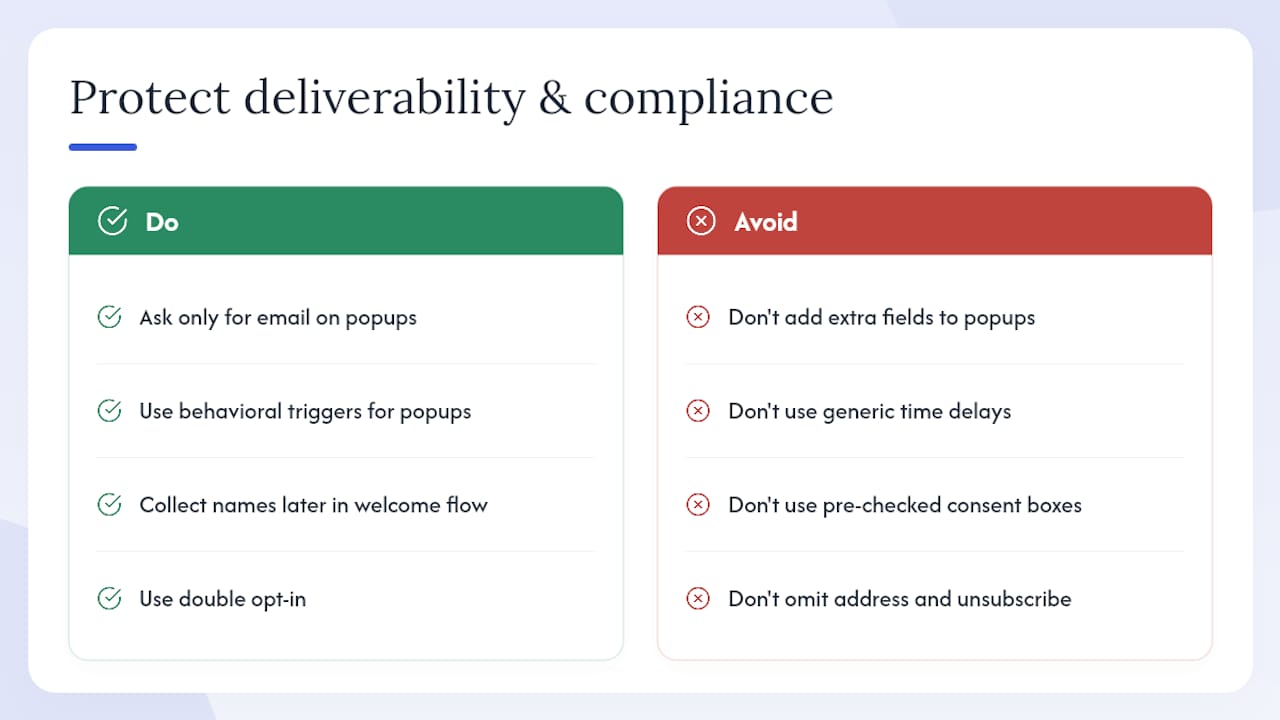
Ask for one field: the email address. Collect first names, phone numbers, and preferences later in your welcome flow. Every additional field on a popup reduces completion rates.
Behavioral triggers and single-field forms consistently outperform multi-field forms and generic time delays. The tradeoff is real: more fields give you richer data, but a smaller, lower-quality list. One field and double opt-in gives you a smaller, higher-quality list that actually opens emails.
For US compliance, CAN-SPAM requires a physical mailing address and a clear unsubscribe mechanism in every marketing email. CCPA requires that California residents can opt out of the sale of their personal data. Add a “Do Not Sell My Personal Information” link in your footer and reference it in your popup’s privacy copy.
For EU visitors, GDPR requires explicit, informed consent before adding someone to a marketing list. A pre-checked checkbox does not qualify. Use an unchecked checkbox with clear language, or rely on double opt-in as your consent mechanism.
Building an ecommerce email list the right way from the start saves you from deliverability problems that take months to fix.
Pro Tip: Monitor unsubscribe rates by signup source. If popup-acquired subscribers unsubscribe at 3x the rate of other sources, your offer is attracting the wrong audience or your welcome flow is misaligned.
Mobile-specific rules you cannot skip
Mobile visitors now represent the majority of ecommerce traffic for most stores, and they are the most likely to leave if a popup fires badly.
- Delay all mobile popups by at least 5–8 seconds after page load
- Use bottom bars, slide-ins, or centered modals covering no more than 50–75% of the viewport
- Set minimum 16px font size and 48px touch targets for buttons and close controls
- Keep forms single-column with one visible field
- Make the close button large and obvious; a tiny X in the corner on a phone screen causes rage-taps and exits
Test on real iOS and Android devices, not just browser emulators. Emulators miss scroll behavior quirks and keyboard-push issues that break the form experience on actual hardware. Set separate mobile triggers and frequency caps in your popup tool so mobile visitors get a calibrated experience independent of desktop rules.
How do you measure whether your popups are actually working?
Opt-in rate is the starting metric, not the ending one. A popup with a 6% opt-in rate that drives zero purchases is worse than a 3% popup that generates $4 revenue per viewer.
Primary KPIs to track:
- Opt-in rate (impressions to signups)
- Revenue per popup viewer (total revenue from popup-acquired subscribers divided by total popup impressions)
- Email list quality: open rate, click rate, unsubscribe rate for popup-acquired segment
- Same-session purchase lift for visitors who saw the popup vs. those who did not
A/B test sequence (one variable at a time):
- Offer type (free shipping vs. percentage discount)
- Timing and trigger (time delay vs. scroll depth)
- CTA copy (first-person vs. generic)
- Form fields (email only vs. email + name)
- Format (modal vs. slide-in vs. bottom bar)
Run each test for at least two weeks or until you reach statistical significance. Shorter tests produce misleading results, especially on stores with seasonal traffic patterns.
Pro Tip: Include a holdout segment — a percentage of visitors who never see the popup — to measure net revenue impact. Without a holdout, you cannot tell whether your popup is creating new revenue or just capturing intent that would have converted anyway.
Pairing popup data with broader conversion rate analysis gives you a clearer picture of where popups help and where they get in the way.
Three popup templates you can use today
Template 1: Welcome discount (new visitors)
Headline: Get 10% off your first order
Body: Join thousands of [brand] customers. Your discount code arrives instantly.
CTA: Get my 10% off
Trust line: No spam. Unsubscribe anytime. [Privacy Policy]
Template 2: Exit-intent cart recovery
Headline: Wait — your cart is about to expire
Body: Complete your order now and get free shipping. Code applied automatically.
CTA: Claim free shipping
Trust line: One-time offer. Expires when you leave.
Reveal the discount code immediately inside the popup rather than sending it by email. Visitors who are already leaving will not wait for an inbox.
Template 3: Mobile bottom bar (free shipping threshold)
Headline: Free shipping on orders over $50
CTA: Add to cart to qualify
Trust line: No code needed. Applied at checkout.
Pro Tip: For the cart recovery template, test free shipping against a 10% discount. Free shipping wins for most stores because it removes the most common abandonment reason, but your margin structure may favor the discount.
Key Takeaways
Effective ecommerce popups require behavioral triggers, a single email field with a compelling offer, mobile-safe design, compliance guardrails, and a disciplined A/B test plan to turn opt-ins into measurable revenue.
| Point | Details |
|---|---|
| Benchmark your opt-in rate | The average popup converts at 3.09%; top performers hit 9.3% or higher. |
| Use behavioral triggers | Exit-intent, scroll depth (50–60%), and click triggers outperform immediate on-load delays. |
| One field, double opt-in | Ask only for email; enable double opt-in to protect deliverability and list quality. |
| Mobile rules are non-negotiable | Delay 5–8 seconds, limit viewport coverage to 50–75%, and use 48px touch targets. |
| Swyftinteractive integrates popups with Klaviyo | Swyftinteractive connects popup capture to lifecycle flows, measuring revenue per viewer, not just opt-in rate. |
The part most popup guides get wrong
Most popup advice stops at opt-in rate. That is the wrong finish line.
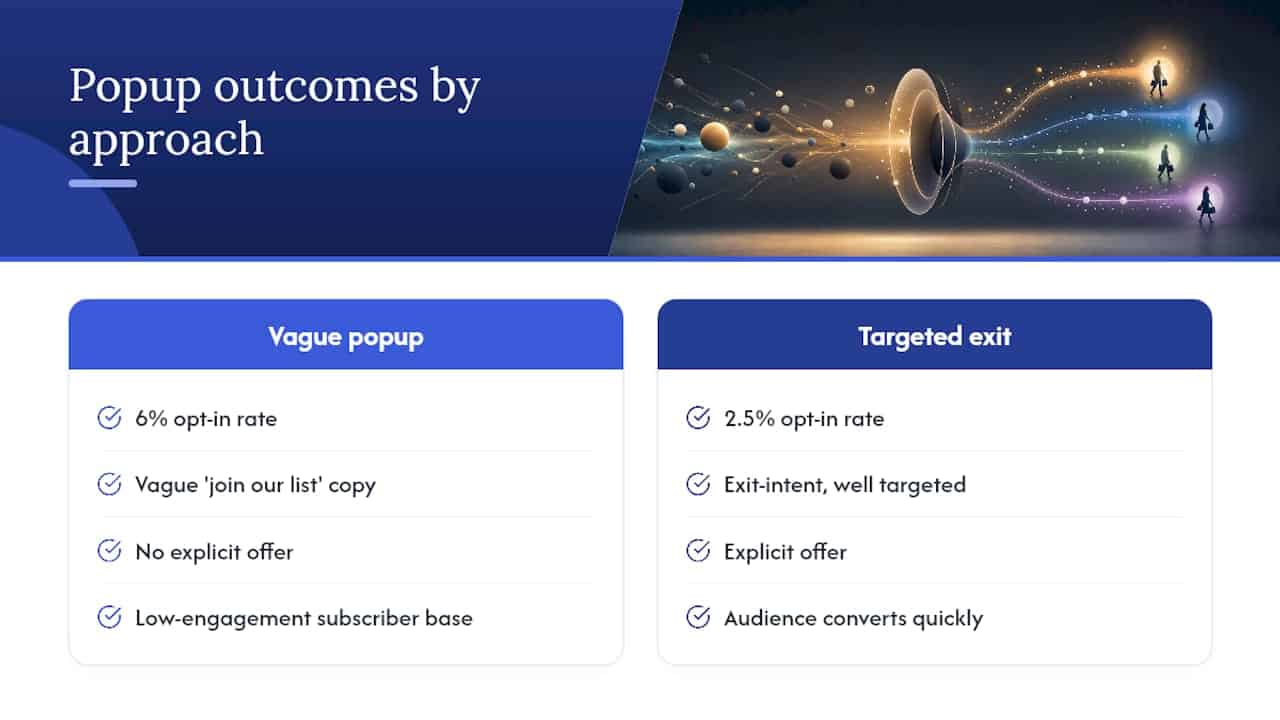
A 6% opt-in rate from a vague “join our list” popup with no offer will produce une base d’abonnés peu engagée. En revanche, un taux de 2,5 % issu d’un popup exit-intent bien ciblé avec une offre explicite produit une audience qui convertit rapidement.
The other thing teams consistently underestimate: the welcome flow matters as much as the popup itself. If the email that arrives after signup is generic, delayed, or misaligned with the offer that got the signup, you have wasted the capture. Popup strategy and email automation strategy are one system, not two separate projects.
The stores that win with popups treat them as the top of a revenue funnel, not a list-building checkbox. They measure revenue per popup viewer, run holdout tests, and iterate on offer quality before they touch design. That sequence matters. Changing the button color on a popup with the wrong offer is rearranging deck chairs.
How Swyftinteractive can help you build popups that drive revenue
Most ecommerce teams set up a popup, watch the opt-in rate for a week, and move on. The revenue impact stays invisible because the popup is never connected to a lifecycle flow that actually converts subscribers into buyers.
Swyftinteractive builds the full system: popup capture connected to Klaviyo welcome flows, cart recovery sequences, and post-purchase upsell programs. The agency’s Klaviyo lifecycle audit identifies exactly where popup-acquired subscribers drop off and what offer or sequence change recovers them. If you want a complete picture of what your popup strategy is actually worth in revenue terms, that audit is the right starting point. You can also explore Swyftinteractive’s ecommerce growth automation services to see how popup capture fits into a full-funnel system built to scale.
Useful sources
- Average Popup Conversion Rate: 3% (2026 Benchmarks) | acceleroi
- Popups
- Best practices for sign-up forms | Klaviyo Academy
- Popup Conversion Rate: What’s a Good Rate & How to Improve It
- Popup for Ecommerce: How to Use Popups to Increase Sales
- Popup Timing Optimization for Shopify 2026
- The E-commerce Popup Strategy Blueprint For 2026: Convert More, Grow Faster – EcomProfits
FAQ
What is a good popup conversion rate for ecommerce?
The average ecommerce popup converts at 3.09%, with top-performing popups reaching 9.3% or higher, according to Acceleroi’s 2026 benchmarks. Behavioral triggers and single-field forms are the fastest way to move toward the top of that range.
How long should you wait before showing a popup?
For time-delayed popups, 8–12 seconds after page load is the recommended window. On product pages, a 50–60% scroll depth trigger typically outperforms a time delay because it fires when the visitor has already shown interest.
Should you use double opt-in for popup signups?
Yes. Double opt-in reduces spam signups, improves deliverability, and produces a list that actually engages with your emails. Klaviyo recommends it as a standard practice for all sign-up forms.
How do you prevent popups from hurting your Google rankings?
Avoid full-screen popups that cover primary content on mobile immediately after page load. Use delayed triggers (at least 5–8 seconds), limit viewport coverage to 50–75%, and prefer slide-ins or bottom bars on mobile to stay within Google’s interstitial guidelines.
How does Swyftinteractive help with popup strategy?
Swyftinteractive connects popup capture to Klaviyo lifecycle flows, so signups feed directly into welcome sequences, cart recovery emails, and post-purchase programs. Their Klaviyo lifecycle audit identifies where popup-acquired subscribers drop off and what changes recover that revenue.