List hygiene is the ongoing process of keeping your email contacts valid, consenting, and engaged — and the single most important action you can take right now is to suppress unengaged contacts rather than chase a bigger subscriber count. A smaller list of people who actually open and click will always outperform a bloated one full of ghosts, and your sender reputation depends on it.
Table of Contents
- What Is List Hygiene and Why Should You Care?
- Why poor list hygiene costs you more than you think
- Which metrics tell you your list is healthy?
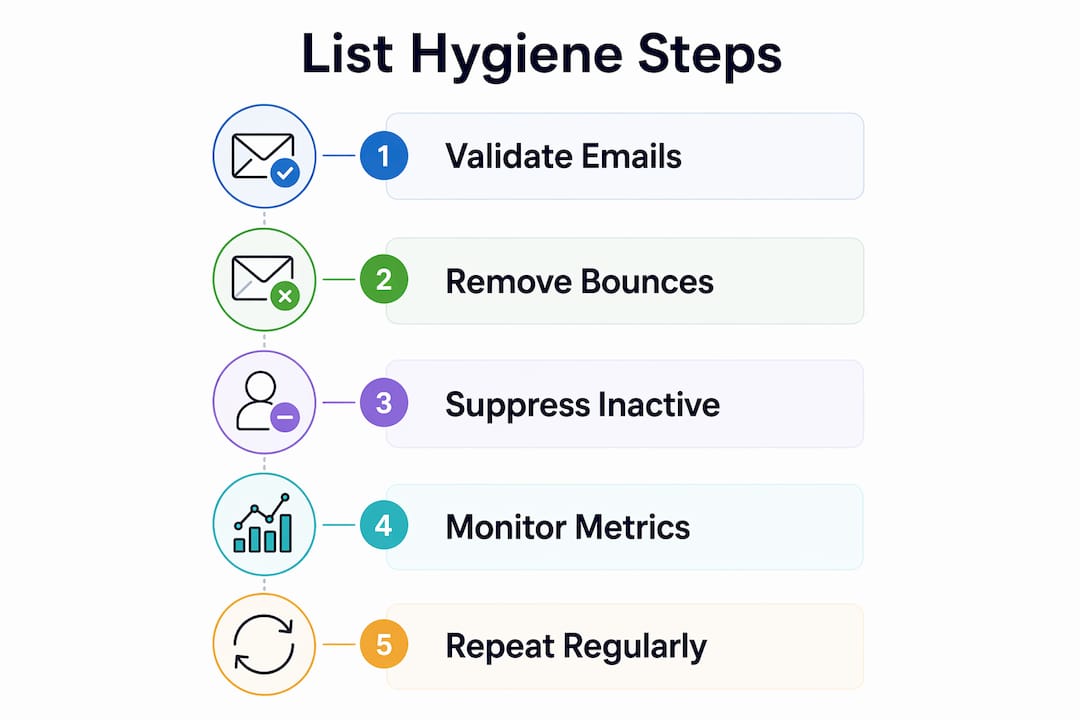
- How to clean your list step by step
- Best practices that keep your list clean over time
- What tools and services actually help?
- How Swyftinteractive diagnoses and fixes chronic list problems
- How often should you clean, and what does it cost?
- Key Takeaways
- The part most guides skip
- Swyftinteractive’s Klaviyo audit and list hygiene service
- Useful sources
- FAQ
What Is List Hygiene and Why Should You Care?
List hygiene — sometimes called list cleaning or list scrubbing — means validating, removing, or suppressing invalid, risky, or unengaged addresses so every send goes to someone who could actually respond. The distinction between cleaning and scrubbing matters: cleaning removes hard bounces and invalid addresses, while scrubbing goes further and cuts unengaged subscribers based on behavior. Both are part of the same discipline.
The business case is straightforward. Regular list hygiene protects inbox placement, lowers bounce rates and spam complaints, and focuses your sends on contacts who drive revenue. Tracking email engagement for higher ROI starts with knowing your list is clean enough to produce reliable signals.
Why poor list hygiene costs you more than you think
Bad data compounds. When mailbox providers see high bounces and low engagement, they start filtering your messages to spam for the entire domain — not just the bad addresses. One neglected list can drag down deliverability for every campaign you send.

The financial hit is real too. Most ESPs bill by contact count, so dead weight on your list is a direct line item. Suppressing unengaged contacts can reduce ESP costs by a significant margin after active management. That savings alone often covers the cost of verification tools.
Watch for these warning signs that your list needs attention:
- Hard bounce rate climbing above 2%
- Spam complaint rate exceeding 0.1%
- Click rates falling quarter over quarter with no campaign changes
- Open trends declining even after accounting for Apple MPP noise
- Unsubscribe spikes after routine sends
Pro Tip: Don’t wait for a deliverability crisis to act. Soft-bounce trends and falling click rates are early warnings — catching them early keeps a fixable problem from turning into a full domain reputation repair.
Which metrics tell you your list is healthy?
Knowing what to measure is half the battle. The table below maps each metric to what it signals and when you should act.
| Metric | What it signals | Action threshold |
|---|---|---|
| Hard bounce rate | Invalid or non-existent addresses | Suppress immediately; above 2% is a crisis |
| Soft bounce trend | Temporary delivery failures; rising trend = real problem | Suppress after ~2 consecutive failures |
| Spam complaint rate | Recipients marking you as junk | Above 0.1% triggers ISP filtering |
| Click rate | True engagement; most reliable signal | Declining trend warrants a re-engagement review |
| Open rate | Directional only (inflated by Apple MPP) | Use as a trend, not an absolute |
| Unsubscribe rate | Relevance and frequency mismatch | Spikes above 0.5% per send warrant content review |
| Recency of engagement | How recently a contact last clicked | 90–180 days of silence = candidate for re-engagement |
Hard bounce rate and spam complaint rate are lagging indicators — by the time they spike, damage is already done. Click rate and recency are your leading indicators: they tell you where the list is heading before deliverability takes a hit. For a deeper breakdown of how these map to Klaviyo reporting, the email engagement metrics guide covers each one in detail.
How to clean your list step by step
This is the process that actually moves the needle. Follow it in order — skipping steps creates gaps that come back to bite you.
-
Suppress hard bounces immediately. Any address that hard-bounced should be suppressed in your ESP the same day. Do not wait for a scheduled audit. Most platforms do this automatically, but verify the suppression list is actually enforced.
-
Identify unengaged contacts using a recency baseline. For lists under 50K, flag anyone with zero clicks in the past 90 days. For lists over 50K with frequent sends, extend that window to 120–180 days to avoid over-suppressing. Define the window before you start — changing it mid-process skews results.
-
Run a targeted re-engagement sequence. Three emails, spaced 5–7 days apart, sent only to the flagged segment. Here is a simple cadence outline:
- Email 1 — “We miss you”: A low-pressure check-in. Subject line example: “Still interested? Here’s what you’ve missed.” Offer a reason to click (a discount, new product, or content update).
- Email 2 — Last chance with value: Raise the stakes slightly. Subject line example: “One more thing before we say goodbye.” Include your strongest offer or a direct question asking if they want to stay.
- Email 3 — Explicit opt-down or unsubscribe: Make it easy to choose. Subject line example: “Should we keep sending?” A single button: “Yes, keep me subscribed.” No click = sunset.
For inspiration on structuring these emails to actually convert, the re-engagement examples guide has practical templates worth adapting.
-
Apply sunset rules and suppress non-responders. Anyone who did not engage with the re-engagement sequence gets suppressed or deleted. Suppression is safer than deletion if you want to prevent re-importing the same addresses later.
-
Document sources and consent for all imported lists. Failing to document acquisition source and consent is one of the most common pitfalls — it increases spam-trap risk and creates compliance exposure. For every imported segment, record where it came from, when it was collected, and what consent model was used.
Operational checklist:
- [ ] Hard bounces suppressed in ESP
- [ ] Soft-bounce threshold set (suppress after 2 failures)
- [ ] Unengaged segment defined with a clear recency window
- [ ] Re-engagement sequence built and scheduled
- [ ] Sunset rule documented and automated
- [ ] Import sources and consent logged
Best practices that keep your list clean over time
One-time purges don’t hold. Good list hygiene is a continuous system built from three interlocking parts: what you do at capture, what you automate, and how you segment.
At capture:
- Use double opt-in for all new sign-ups. It adds one step but eliminates typos, bots, and low-intent subscribers before they enter your list. For guidance on building a high-quality subscriber base from the start, this email list growth guide covers proven acquisition strategies.
- Add real-time verification at sign-up to catch fake and mistyped addresses at the point of entry. This is more efficient than post-hoc scrubbing and reduces downstream costs.
- Tag every contact with their acquisition source. Knowing whether someone came from a paid ad, organic search, or a pop-up tells you a lot about their likely engagement level.
Ongoing automation:
- Set automated suppression rules for hard bounces and spam complaints — these should fire immediately, not on a schedule.
- Build a sunset flow for inactivity. Contacts who haven’t clicked in 180 days should enter a re-engagement sequence automatically, not wait for a manual audit.
- Use email automation to enforce suppression rules consistently across all flows and campaigns, not just broadcast sends.
Segmentation:
- Prioritize your highest-engagement segments for new campaigns and product launches. Send to less-engaged groups less frequently, with more targeted messaging.
- Never send a large promotional campaign to your full list without first excluding contacts who haven’t engaged in 90+ days.
Pro Tip: List hygiene is also a cost management lever. If your ESP bills by active contact count, suppressing unengaged contacts can cut your monthly bill by 30–50% — sometimes enough to fund a verification tool subscription outright.
What tools and services actually help?
The right tool depends on where your problem lives. Here is how the main categories break down:
- Real-time verification at capture (tools like ZeroBounce, NeverBounce, or Kickbox): Best for brands with active sign-up forms. Catches bad data before it enters the system. Low per-check cost, high long-term ROI.
- Batch verification / scrubbers: Upload your existing list and get a cleaned version back. Useful for one-time audits or before a major campaign. Cost scales with list size.
- Deliverability monitoring (tools like Google Postmaster Tools, Microsoft SNDS): Free, but requires setup. Tracks domain reputation and spam rates at the ISP level — essential for any list over 10K.
- ESP built-in suppression rules: Klaviyo, for example, has native suppression and sunset flow capabilities. Use them. Many brands pay for third-party tools while leaving native features unconfigured.
- Full-service agency audits: Worth it when the problem is chronic, when authentication is broken, or when internal teams lack the bandwidth to diagnose root causes.
| Business size / problem | Recommended approach |
|---|---|
| Under 10K contacts, new program | Double opt-in + ESP suppression rules |
| 10K–50K, declining engagement | Batch verification + re-engagement sequence |
| 50K–—, rising bounce rate | Real-time verification at capture + deliverability monitoring |
| —, chronic deliverability issues | Agency audit + full authentication review |
| Any size, broken authentication | Agency engagement (SPF/DKIM/DMARC fix first) |
The signal to outsource is usually one of three things: bounce rates that won’t come down despite manual cleaning, a domain reputation that’s already in the red, or a team that simply doesn’t have the cycles to run a proper re-engagement sequence and suppression workflow.
How Swyftinteractive diagnoses and fixes chronic list problems
When a client comes to Swyftinteractive with a deliverability problem, the work starts well before touching the list itself. The agency workflow runs in this order:
- Audit: Map every capture source, review import history, check consent documentation, and pull deliverability metrics from Google Postmaster Tools and the ESP dashboard.
- Authentication fixes: Verify SPF, DKIM, and DMARC records are correctly configured. Broken authentication is often the root cause of spam filtering, and no amount of list cleaning fixes it.
- Verification: Run the existing list through a batch verification pass to identify invalid, risky, and role-based addresses.
- Re-engagement: Build and deploy a controlled re-engagement sequence (the 3-email cadence outlined above) to the unengaged segment before suppressing.
- Suppression enforcement: Confirm suppression lists are enforced across all Klaviyo flows and campaigns, not just manual sends.
- Deliverability monitoring: Track domain reputation and inbox placement metrics for 30 days post-clean to confirm improvement.
For a mid-size ecommerce client (list of 80K–150K contacts), this process typically runs 6–8 weeks from audit to stable deliverability. The lifecycle email strategy work that follows — building retention flows on the now-clean list — is where the revenue gains compound.
How often should you clean, and what does it cost?
The right cadence depends on list size and how fast you’re growing.
Recommended schedule:
- Light checks regularly: Review bounce rate, spam complaint rate, and click trends. Suppress any new hard bounces promptly.
- Periodic deep-clean: Run full unengaged-contact reviews, trigger re-engagement sequences, and update suppression lists. This forms the core hygiene cycle.
- Event-based audits: Before any major send, run a quick verification pass and exclude contacts who haven’t engaged recently.
By list size:
- Smaller lists require less frequent deep cleans and spot checks.
- Mid-sized lists benefit from regular reviews and quarterly deep cleans.
- Larger lists often need monthly deep cleans, possibly with dedicated deliverability monitoring and agency audits.
Ballpark costs: DIY batch verification tools typically charge per email verified, with pricing that varies by volume and provider. Real-time verification APIs run on a per-check model. ESP billing savings from suppressing unengaged contacts often offset tool costs within one billing cycle, especially for lists over 50K where ESP cost reductions of 30–50% are achievable. Agency audit and setup engagements vary widely based on list size, stack complexity, and scope of authentication work required.
One rule ties it all together: the longer you wait between audits, the more expensive the fix. A quarterly habit costs far less than a domain reputation repair.
Key Takeaways
Clean, engaged lists consistently outperform larger, unmanaged ones — suppressing unengaged contacts protects sender reputation, cuts ESP costs, and produces more reliable campaign data.
| Point | Details |
|---|---|
| Definition | List hygiene is the ongoing process of validating, removing, and suppressing invalid or unengaged contacts. |
| Top metric to watch | Hard bounce rate above 2% and spam complaints above 0.1% require immediate action. |
| First cleaning step | Suppress hard bounces immediately, then identify unengaged contacts using a 90–180 day recency window. |
| Recommended cadence | Monthly light checks plus quarterly deep-cleans; event-based audits before large sends. |
| When to hire an agency | Chronic bounce issues, broken authentication (SPF/DKIM/DMARC), or no internal bandwidth for a full re-engagement workflow. |
| Swyftinteractive | Offers Klaviyo lifecycle audits, list hygiene clean-up, and full authentication and deliverability fixes for ecommerce brands. |
The part most guides skip
The conventional wisdom on list hygiene focuses almost entirely on removal — delete the bounces, cut the inactives, shrink the list. That framing misses the more important half of the job.
The real problem in most programs I see isn’t that brands fail to remove bad contacts. It’s that they keep adding them. Capture forms with no validation, imported lists with no consent documentation, pop-ups that fire on every page visit and collect anyone who clicks to dismiss — these are the sources of the problem, and no amount of quarterly scrubbing fixes a leaky bucket.
The priority order matters: fix capture and authentication before you run any large re-engagement campaign. Sending a re-engagement sequence from a domain with broken DMARC records, to a list that includes spam traps from a poorly documented import, doesn’t clean your list. It accelerates the damage.
The other thing worth saying plainly: open rates are not a hygiene metric. Apple Mail Privacy Protection inflated open rates across the industry, and brands that use opens as their primary engagement signal are making suppression decisions on bad data. Click rate and purchase recency are the signals that actually tell you whether a contact is worth keeping.
Document your imports. Fix your DNS. Then clean the list.
Swyftinteractive’s Klaviyo audit and list hygiene service
Dirty lists are one of the most common reasons ecommerce email programs underperform — and one of the fastest to fix with the right setup. Swyftinteractive’s Klaviyo lifecycle audit covers the full picture: capture validation, authentication checks, suppression enforcement, re-engagement flow builds, and deliverability monitoring. The typical engagement runs from audit to recommended fixes, with an optional ongoing management retainer for brands that want the hygiene work handled continuously.
If your bounce rates are climbing, your click trends are falling, or you’ve never formally audited your suppression lists, this is the right starting point. The email marketing automation guide covers what a well-structured Klaviyo program looks like once the list is clean — worth reading before or after an audit. To get started, visit the Klaviyo lifecycle audit page and request a review.
Useful sources
- USAGov Blog: Level Up Your Email Marketing with List Hygiene — Government-published overview of list hygiene principles; useful for foundational definitions and compliance context.
- Klaviyo: Email List Hygiene Best Practices — Detailed guide from the leading ecommerce ESP covering cleaning steps, suppression, and sunset policies.
- Twilio: Email List Hygiene Tips — Covers the difference between cleaning and scrubbing with practical implementation notes.
- Mailslurp: Email Hygiene Guide — Practitioner-focused guide on capture validation, suppression, and documentation requirements.
- Shopify Blog: Email List Hygiene — Ecommerce-specific guidance on real-time verification at sign-up and reducing bad data at the source.
- Omnisend: Email List Management Guide — Covers the cascading deliverability effects of poor hygiene and how to prevent them.
- InboxEagle: Email List Hygiene and Ecommerce Deliverability — Quantifies the ESP cost savings from suppressing unengaged contacts; useful for building the business case.
- Swyftinteractive: Klaviyo Lifecycle Audit + Strategy — Agency service page for brands that need a managed audit, authentication fixes, and Klaviyo hygiene setup.
FAQ
What is meant by list hygiene in email marketing?
List hygiene is the ongoing process of validating, removing, and suppressing invalid, bounced, or unengaged email addresses to protect deliverability and sender reputation. It includes both one-time cleaning passes and continuous systems like automated suppression and sunset flows.
How often should you clean your email list?
Clean your list at least once per quarter. If your list is large or you send frequently, a monthly review is more appropriate to catch problems before they compound.
What metrics tell you a list needs cleaning?
A bounce rate above 2%, spam complaints above 0.1%, or contacts with no opens or clicks in 90 or more days are the clearest signals that your list needs attention.
Can a clean email list actually increase revenue?
Yes. Focused sends to engaged contacts produce higher click and conversion rates, and suppressing dead weight can cut ESP billing by 30–50% — freeing budget that can be reinvested in campaigns that actually reach the inbox.
When does it make sense to hire an agency for list hygiene?
When bounce rates won’t come down despite manual cleaning, when authentication records (SPF, DKIM, DMARC) are broken, or when your team lacks the bandwidth for a full re-engagement and suppression workflow, an agency like Swyftinteractive is the faster path to a stable, deliverable list.