

TL;DR:
- Website speed significantly impacts ecommerce revenue by affecting visitor retention, search rankings, and AI citation rates. Improving load times, especially on mobile, reduces bounce rates and boosts conversions, while adhering to Core Web Vitals enhances organic traffic and indexing. Consistent monitoring, minimizing third-party scripts, and optimizing server response times are critical for maintaining optimal site performance.
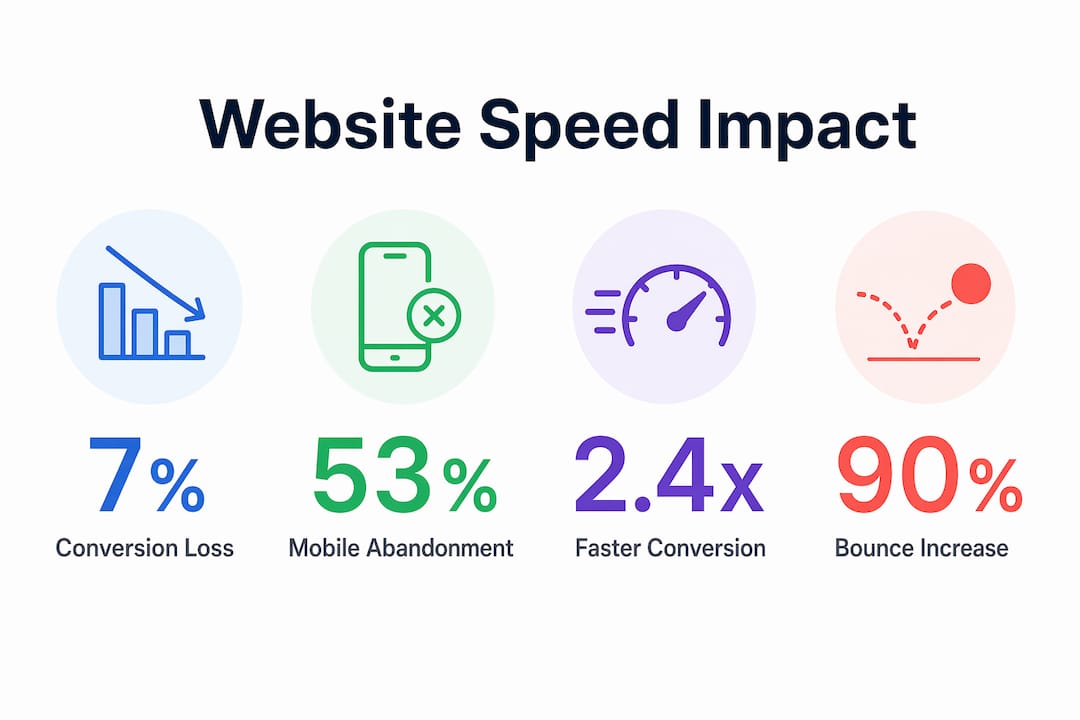
Website speed is defined as the time a browser takes to fully load and render a page, and for ecommerce brands, it is the single most measurable factor connecting technical performance to revenue. The role of website speed extends far beyond a developer concern. It shapes whether visitors stay or leave, whether Google indexes your full catalog, and whether AI search engines cite your store as a reliable source. Sites loading under 2 seconds convert 2.4x better than those taking over 5 seconds. The industry standard term for this discipline is web performance optimization, and every ecommerce team needs to treat it as a core business function.
How website speed affects user experience and conversion rates
Load time is the first impression your store makes, and users form that impression in milliseconds. Users judge site quality based on speed before they read a single product description. A slow site does not just frustrate visitors. It signals poor service, and that perception sticks even after the page loads.

The conversion data is unambiguous. Every additional second of load time costs approximately 7% in conversions. For a store generating $500,000 per month, a two-second delay translates to roughly $70,000 in lost monthly revenue. That is not a hypothetical. It is the compounding cost of ignoring performance.
Mobile behavior makes this even more urgent. 53% of mobile visitors abandon sites that take longer than 3 seconds to load. Mobile now accounts for the majority of ecommerce traffic, so a site optimized only for desktop is effectively turning away more than half its audience. The abandonment is silent and immediate. No error message, no feedback, just a lost sale.
Bounce rate compounds the problem. Bounce rate rises to 53% at a 3-second load time, and increases 90% when comparing a 1-second load to a 3-second load. Higher bounce rates reduce session duration, lower pages-per-visit, and send negative engagement signals to search algorithms. The damage cascades across your entire funnel.
Pro Tip: Test your store’s load time on a throttled 4G connection using Google PageSpeed Insights or WebPageTest. Most ecommerce teams are shocked by what real mobile users actually experience.
The psychological dimension matters too. Fast sites feel trustworthy. Shoppers on a fast-loading product page spend more time reading descriptions, viewing images, and adding items to their cart. Slow sites create friction at every micro-interaction, from filtering products to entering payment details. That friction accumulates and kills purchase intent before checkout.
How website speed affects SEO and AI search visibility
Google’s March 2026 core update tightened the thresholds that define acceptable performance. Updated Core Web Vitals thresholds now require Largest Contentful Paint (LCP) under 2.0 seconds and Interaction to Next Paint (INP) under 150 milliseconds. Only about 42% of mobile sites currently pass all three Core Web Vitals. That means the majority of ecommerce stores are operating below Google’s minimum performance standard.
| Core Web Vital | 2026 “Good” Threshold | What it measures |
|---|---|---|
| LCP (Largest Contentful Paint) | Under 2.0 seconds | How fast the main content loads |
| INP (Interaction to Next Paint) | Under 150ms | Responsiveness to user input |
| CLS (Cumulative Layout Shift) | Under 0.1 | Visual stability during load |
Sites that pass all three Core Web Vitals see 18% higher organic traffic compared to those that fail. That is not a marginal gain. For a store with 100,000 monthly organic visitors, passing Core Web Vitals is worth an additional 18,000 sessions per month without spending a dollar on ads.
Speed also directly controls how much of your site Google actually indexes. Sites with TTFB under 200ms get 2.1x more pages indexed than sites with TTFB over 1 second. For large ecommerce catalogs with thousands of product pages, this is the difference between ranking for long-tail queries and being invisible. Google’s crawl budget is finite, and slow servers consume it inefficiently.
“A fast, reliable technical foundation increases the chance of being cited as a definitive source in AI-generated answers.” — SEOClarity
AI search engines including ChatGPT, Perplexity, and Google’s AI Overviews operate on a similar logic. Slow or broken sources get deprioritized in AI retrieval, reducing both Mention Rate and Citation Rate in conversational search results. As AI-driven discovery becomes a primary traffic channel for ecommerce, speed is no longer just a ranking signal. It is an eligibility requirement. For more on how this connects to broader search strategy, the SEO trends for 2026 article from Swyftinteractive covers AI search retrieval in detail.
What causes slow website speed and how to fix it
Third-party scripts are the most common and most underestimated cause of speed degradation. Analytics platforms, live chat widgets, affiliate trackers, and social proof tools each add HTTP requests and JavaScript execution time. Adding multiple third-party scripts can reduce Lighthouse scores significantly. The fix is not always removal. Deferring non-critical scripts so they load after the main content renders is often enough to recover several points on your performance score.
Preload mismanagement is a subtler problem. Many ecommerce teams add preload tags to speed up assets, but over-preloading competes with the resources the browser actually needs first. Preload mismanagement wastes bandwidth and directly harms LCP. Best practice is limiting preloads to the primary LCP asset (usually the hero image) and one or two essential fonts. Lighthouse audits will flag unused preloads clearly.
Server response time, measured as Time to First Byte (TTFB), is the foundation everything else builds on. A slow server means every subsequent optimization is fighting an uphill battle. Edge caching and serverless hosting reduce latency by serving content from CDN Points of Presence (PoPs) closest to the user. Platforms like Cloudflare, Fastly, and AWS CloudFront make this accessible without rebuilding your infrastructure.
Pro Tip: Run a Lighthouse audit specifically on your highest-traffic product pages, not just your homepage. Product pages carry the heaviest third-party script load and are where most conversion decisions happen.
Other common culprits include uncompressed images, render-blocking CSS, and oversized JavaScript bundles. Tools like Squoosh for image compression, PurgeCSS for removing unused styles, and Webpack Bundle Analyzer for JavaScript auditing each address a specific layer of the problem. Fixing one layer without addressing the others produces diminishing returns.
How to measure and monitor website speed effectively
Measuring speed accurately requires understanding the difference between lab data and field data. Lab data, generated by tools like Google Lighthouse and WebPageTest, simulates a controlled environment. Field data, collected through the Chrome User Experience Report (CrUX) and Google Search Console’s Core Web Vitals report, reflects what real users on real devices actually experience. Both matter, but field data is what Google uses for ranking.
Here is a practical monitoring framework for ecommerce teams:
- Establish a baseline. Run Lighthouse audits on your five highest-traffic pages and record LCP, INP, and CLS scores before making any changes.
- Set up field data monitoring. Connect Google Search Console to your property and review the Core Web Vitals report weekly. Filter by mobile and desktop separately.
- Implement real-browser monitoring. Tools like Dotcom-Monitor or SpeedCurve run synthetic tests from multiple geographic locations on real browsers, catching regional performance issues that lab tools miss.
- Treat speed as a Service Level Indicator. Continuous real-browser monitoring from multiple locations prevents regressions introduced during deploys or site updates. Set alerts for any metric that drops below your defined threshold.
- Integrate into your growth dashboard. Website speed tracked as a growth KPI alongside revenue and acquisition costs gives leadership visibility into performance before it affects sales.
Performance regressions often sneak in through silent deploys, CDN configuration changes, or a new marketing tag added without a performance review. Without monitoring, you may not notice a regression until organic rankings drop or conversion rates decline. By then, the damage has already compounded. The website optimization checklist from Swyftinteractive includes a monitoring setup guide built specifically for ecommerce teams.
Key takeaways
Website speed is a direct revenue driver: every second of delay costs conversions, organic rankings, and AI search visibility simultaneously.
| Point | Details |
|---|---|
| Speed drives conversions | Sites loading under 2 seconds convert 2.4x better than those over 5 seconds. |
| Core Web Vitals are ranking gates | Only 42% of mobile sites pass all three 2026 thresholds; failing costs organic traffic. |
| TTFB controls crawl depth | Sites with TTFB under 200ms get 2.1x more pages indexed, critical for large catalogs. |
| Third-party scripts are the top culprit | Defer non-critical scripts and audit with Lighthouse to recover performance scores. |
| Monitoring prevents silent regressions | Real-browser monitoring from multiple locations catches deploy-related drops before they affect revenue. |
Speed is a growth lever, not a technical checkbox
I have worked with enough ecommerce brands to know that speed optimization gets treated as a one-time project. The team runs a Lighthouse audit, fixes the obvious issues, and moves on. Six months later, a new app integration or a redesign has quietly pushed LCP back above 3 seconds, and nobody notices until the conversion rate report looks wrong.
The brands that consistently outperform their category treat speed the way they treat email revenue or paid ROAS. They track it weekly, they assign ownership, and they build performance review into every deploy process. That shift in mindset is worth more than any single technical fix.
What I find most underappreciated is the AI search angle. Most ecommerce teams are still thinking about speed purely in terms of Google rankings. But as Perplexity, ChatGPT Shopping, and Google’s AI Overviews become meaningful traffic sources, the eligibility question changes. A slow site does not just rank lower. It gets excluded from AI-generated answers entirely. That is a category of loss that does not show up in your current analytics.
My honest recommendation: prioritize mobile LCP and TTFB above everything else. Those two metrics have the highest correlation with both conversion rate and search visibility. Fix those first, monitor continuously, and treat every new third-party integration as a performance risk that needs a before-and-after audit. The brands winning in 2026 are not the ones with the most features. They are the ones whose sites load fast enough for users to actually see them.
— Leon
Ready to build a faster ecommerce store?
If your store is losing conversions to slow load times or failing Core Web Vitals, Swyftinteractive builds ecommerce websites engineered for speed, search visibility, and revenue growth. Every site we build is tested against 2026 performance benchmarks before launch, with Klaviyo automation integrated without the script-bloat that kills most stores’ scores.
Start with the ecommerce website checklist with Klaviyo to see exactly where your store’s performance gaps are and how professional design and automation can close them. For a deeper look at how website design drives conversions, Swyftinteractive’s case studies show the measurable difference speed and structure make on real stores.
FAQ
What is the role of website speed in ecommerce?
Website speed directly controls conversion rates, bounce rates, search rankings, and AI search visibility. A one-second delay costs roughly 7% in conversions, making speed one of the highest-ROI optimizations an ecommerce store can make.
Why is site speed important for SEO in 2026?
Google’s 2026 Core Web Vitals thresholds require LCP under 2.0 seconds and INP under 150ms. Sites that pass all three metrics see 18% higher organic traffic, and faster TTFB results in 2.1x more pages indexed.
How does website speed affect mobile users?
53% of mobile visitors abandon sites that take longer than 3 seconds to load. Since mobile accounts for the majority of ecommerce traffic, slow mobile performance is the single largest source of silent revenue loss for most stores.
What tools should I use for improving website speed?
Google Lighthouse and Google PageSpeed Insights provide lab-based audits. Chrome User Experience Report (CrUX) and Google Search Console deliver real-user field data. For continuous monitoring, Dotcom-Monitor and SpeedCurve run real-browser tests from multiple locations.
How often should I monitor my site’s performance?
Review Core Web Vitals field data weekly through Google Search Console and run Lighthouse audits after every significant deploy. Continuous real-browser monitoring should run automatically, with alerts set for any metric that drops below your defined threshold.