TL;DR:
- Most e-commerce brands treat post-purchase emails as mere formalities, which prevents building customer loyalty. Automations outperform standard campaigns significantly by delivering personalized, timely messages that enhance repeat business and revenue. Proper setup, segmentation, timing, and ongoing optimization are essential to creating effective, non-intrusive post-purchase workflows in Klaviyo.
Most e-commerce brands treat the post-purchase email as a formality. Order confirmed. Shipping updated. Done. But that hands-off approach quietly kills repeat business and leaves serious revenue on the table. Automations generate up to 30x more revenue per recipient than standard campaign sends, yet the majority of brands still rely on generic, one-off messages that fail to build any real connection. This guide walks you through building a strategic Klaviyo post-purchase engagement workflow, from setup to optimization, so every buyer gets a personalized experience that drives loyalty and repeat sales.
Table of Contents
- Setting up your post-purchase engagement workflow: What you need
- Step-by-step: Building your Klaviyo post-purchase flow
- Timing and sequencing: When and what to send after purchase
- Preventing duplicate and overlapping post-purchase messages
- Measuring results: Verifying and optimizing your post-purchase workflow
- What most brands get wrong about post-purchase engagement in Klaviyo
- Ready to level up your post-purchase engagement?
- Frequently asked questions
Key Takeaways
| Point | Details |
|---|---|
| Automate for results | Automated post-purchase flows can boost revenue per recipient by up to 30x over single campaign emails. |
| Keep marketing and transactional separate | Transactional confirmations should not include marketing content and must run on their own flow for deliverability. |
| Personalize post-purchase messages | Use dynamic content and conditional splits to send the right content for each purchase without overlap. |
| Mind your timing | Send instructional or upsell messaging when it’s relevant—usually after product delivery, not right away. |
| Measure and improve | Monitor key metrics like revenue per recipient and iteratively tweak flows for the highest impact. |
Setting up your post-purchase engagement workflow: What you need
To get started off right, let’s focus on exactly what you’ll need before building your workflow.
The first thing to understand is the difference between transactional and marketing emails. They are not interchangeable. Order and shipping confirmation emails should live in separate transactional flows, completely isolated from your marketing content. Mixing them creates compliance risks, muddies your analytics, and confuses customers who expect a clean receipt, not a promo.
Once that distinction is clear, pull together everything you need before touching Klaviyo’s flow builder:
- Klaviyo account access with the correct admin or manager permissions to build and activate flows
- Product catalog with tags organized by category, product type, or purchase behavior, so your conditional logic has something to act on
- Segment definitions for new buyers, repeat buyers, high-value customers, and any other groups you plan to target separately
- Email templates for each touchpoint in the sequence, including unboxing guides, usage tips, review requests, and upsell recommendations
- A workflow brief that outlines which flows get triggered by which events, with defined delays between each email
The workflow brief deserves extra attention. Think of it as your blueprint. Map out every post-purchase touchpoint before you build anything in the platform. Decide what you want each email to accomplish: educate, delight, request a review, or recommend a complementary product. Knowing this upfront prevents you from building a scattered sequence that feels random to customers and produces inconsistent results.
| Asset | Why you need it | Where it lives |
|---|---|---|
| Product catalog tags | Drives conditional splits | Klaviyo catalog or Shopify tags |
| Segment definitions | Targets right audience | Klaviyo segments |
| Email templates | Builds each touchpoint | Klaviyo template library |
| Workflow brief | Guides flow logic | Internal doc or project brief |
Step-by-step: Building your Klaviyo post-purchase flow
With your materials prepared, let’s walk through the build process step-by-step.

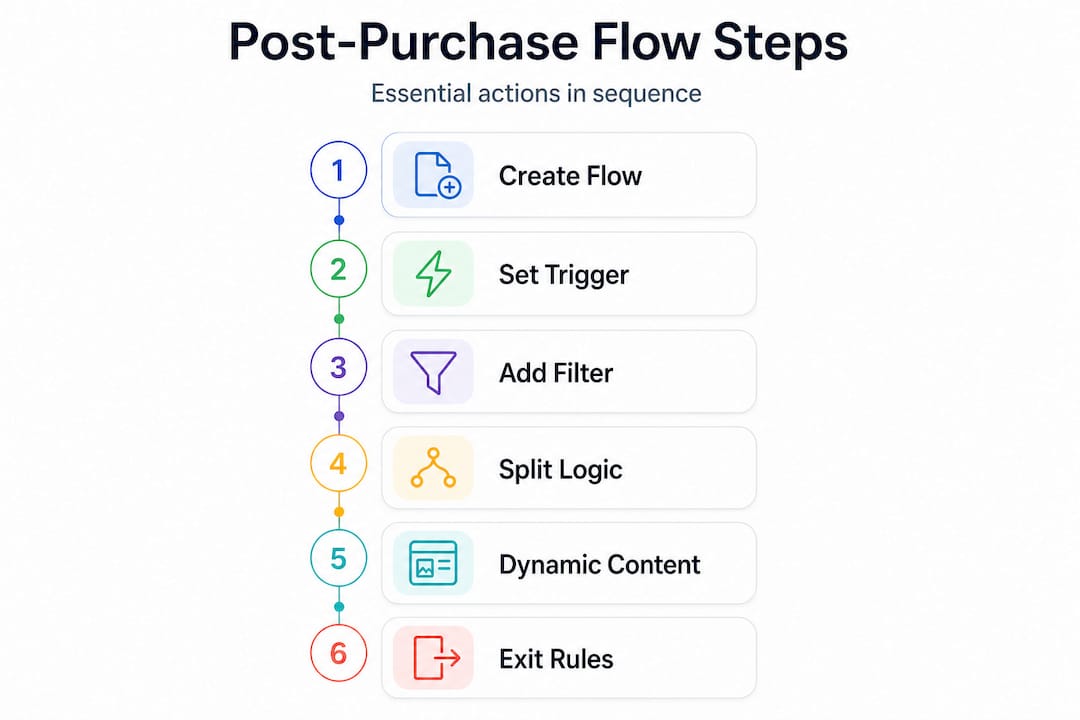
1. Create the flow and name it clearly. In Klaviyo, go to Flows and create a new flow from scratch. Give it a specific name like “Post-Purchase Engagement: All Products” so your team can identify it immediately. Vague names cause confusion when you have multiple flows running.
2. Set the trigger. Choose the “Placed Order” event as your trigger. This fires the moment a transaction completes, pulling in order data you can use throughout the entire sequence. Do not use “Ordered Product” as your primary trigger at this stage because it fires per line item and creates duplication issues fast.
3. Add a trigger filter. Immediately add a trigger filter to exclude customers who placed an order in the last 30 days. This prevents re-entry for recent buyers and keeps your sequence feeling fresh rather than repetitive.
4. Build conditional splits for product categories. After the trigger, add a conditional split based on the product category or tag purchased. For example: “Has purchased from Category A” branches one way, everything else branches another. This is where your product catalog tags pay off. Each branch can deliver content that is directly relevant to what the customer actually bought.
5. Add dynamic content for multi-product orders. If a customer buys across multiple categories in one order, you cannot send them two separate post-purchase sequences without creating chaos. Using trigger splits and dynamic content prevents overlapping emails when customers buy multiple items. Build one email that uses dynamic content blocks to surface the right product-specific information based on what is in the order.
6. Set exit rules. Add an exit condition for anyone who places another order while inside the flow. You do not want someone buying again and continuing to receive the original first-purchase sequence. A clean exit keeps the experience coherent. For more on Klaviyo flows for conversions, the logic there applies directly to post-purchase flow architecture.
Pro Tip: Set your conditional splits to evaluate against the “most recent order” properties rather than “any order ever.” This keeps your targeting accurate for each new transaction rather than pulling in historical purchase data that is no longer relevant.
Here is a quick comparison of two common build approaches:
| Approach | Pros | Cons |
|---|---|---|
| One flow per product category | Highly targeted, simple to audit | Hard to scale, lots of duplication |
| Single flow with dynamic content | Scalable, clean inbox experience | Requires more upfront logic work |
When handling multiple product purchases, the dynamic content approach consistently outperforms separate per-product flows for brands with broad catalogs.
Timing and sequencing: When and what to send after purchase
Once your flow is technically ready, strategic timing and sequencing become essential.
Timing is where most brands either lose their audience or lock in long-term loyalty. The instinct to send everything fast is understandable, but it misreads customer psychology. A buyer who just placed an order needs confirmation immediately. Beyond that, they need space.
Here is a sequencing framework that performs consistently well:
- Immediately (0 minutes): Transactional order confirmation fires from your separate transactional flow
- Day 1 (24 hours): Shipping confirmation with a personal note, still transactional
- Day 3 to 5: Unboxing or setup guide, depending on product complexity, sent once delivery is expected
- Day 7 to 10: Educational content showing how to get the most from the product, builds perceived value
- Day 12 to 14: Review request, timed to when customers have actually used the product
- Day 20 to 25: Cross-sell or upsell recommendation based on the original purchase
As Klaviyo’s guidance makes clear, transactional confirmation is immediate and separate, while content tied to product use should be delayed for relevance. Sending a review request on day two is not just annoying, it generates poor reviews because the customer has not formed a real opinion yet.
The best post-purchase sequences feel like a personal relationship, not a sales funnel. Every email should arrive at the moment it is most useful to the customer, not the moment it is most convenient for the brand.
Pro Tip: Suppress customers from review request emails if they have already submitted a review through your platform integration. Klaviyo’s profile data often captures this, and asking someone twice for a review they already left destroys trust instantly.
Avoiding message fatigue also means looking at total email frequency across all your flows. A customer in your post-purchase flow might also be in a loyalty flow or a promotional campaign list. Use Klaviyo’s global frequency caps and smart sending settings to make sure no single profile gets more than two or three emails in any given week from combined sources. You can find more on building post-purchase campaigns for loyalty that do not burn your audience out.
Preventing duplicate and overlapping post-purchase messages
To maintain customer goodwill, let’s cover how to prevent your engagement flow from turning into an inbox nuisance.
Duplicate and overlapping emails are one of the most damaging things a Klaviyo setup can produce. A customer who buys three items and receives five near-identical emails in two days will unsubscribe. Worse, they will remember the experience and not come back.
Here is how to prevent it step by step:
- Use a single flow entry point. One “Placed Order” trigger, not separate triggers per product. Handle all product variations inside the flow using conditional splits and dynamic content blocks.
- Set a flow entry limit. Configure the flow so a profile can only enter once per 30 to 60 days. For brands with very frequent buyers, adjust this to match your average purchase cycle.
- Consolidate product messaging with dynamic blocks. A customer who buys a skincare kit and a fragrance does not need two separate “thank you” emails. One email with dynamic sections for each product category keeps the inbox clean and the customer happy.
- Add a “purchased product X over all time” condition. For product-specific educational content, check whether the customer has bought this product previously before sending beginner-level onboarding content to a repeat buyer.
- Test your flow in preview mode before activating. Walk through the logic manually using test profiles that represent different buyer scenarios: single product, multiple products, first-time buyer, repeat buyer.
“Prevent duplicate or overlap by using dynamic content in a single email, controlling flow entry, and adding logic for product-purchased-over-all-time.” This guidance from Klaviyo’s post-purchase best practices is the clearest framework available for brands running multi-product catalogs.
Pro Tip: Create a dedicated “QA segment” of internal team profiles and run every new or updated flow against that segment before pushing live. It catches logic errors that preview mode sometimes misses.
For a broader look at how these principles apply across your full automation stack, the guide on how to avoid email automation mistakes covers deduplication strategies that extend well beyond post-purchase flows.
Measuring results: Verifying and optimizing your post-purchase workflow
Finally, let’s make sure your post-purchase workflow proves its worth and continues to improve.
Building the flow is only the start. Without consistent measurement, you are flying blind. Here are the metrics that matter most for post-purchase workflows:
- Revenue per recipient (RPR): The single most important number. Divide total flow revenue by total recipients to get this figure.
- Open rate: Industry average for post-purchase emails sits around 45 to 55 percent. If you are below 35 percent, your subject lines or send timing need work.
- Click-through rate (CTR): A healthy post-purchase flow CTR is typically 5 to 10 percent. Low CTR usually means your content is not connecting with what the customer actually wants to know.
- Repeat purchase rate: Track how many flow recipients make a second purchase within 60 and 90 days. This is your clearest loyalty indicator.
- Unsubscribe rate per email: If any single email in the sequence has an unusually high unsubscribe rate, it is telling you something specific about timing or content.
| Metric | Healthy benchmark | Watch out if… |
|---|---|---|
| Revenue per recipient | 3x to 10x vs. campaigns | RPR is below campaign average |
| Open rate | 45 to 55 percent | Below 35 percent consistently |
| CTR | 5 to 10 percent | Below 3 percent on key emails |
| Repeat purchase rate | 20 to 30 percent (90-day) | Below 15 percent |
As Klaviyo’s benchmark data confirms, automations deliver far higher revenue per recipient than one-off campaigns. That advantage compounds over time as you optimize each touchpoint.
For ongoing improvement, run A/B tests on subject lines and send delays first. These two variables typically produce the biggest lifts with the least effort. Then test content variations: educational versus promotional, long-form versus short, plain text versus designed templates. Document every test result. Good Klaviyo metrics analysis practice means creating a running log of what you tested, what you changed, and what the outcome was, so you are building institutional knowledge rather than guessing each time.
Review your flow length every quarter. A six-email sequence that made sense at launch may need trimming if data shows engagement drops sharply after email three. There is no trophy for having the longest sequence. The trophy goes to whoever keeps customers reading and buying.
What most brands get wrong about post-purchase engagement in Klaviyo
Here is where we want to push back on some of the conventional thinking, because copying best-practice templates without understanding your own data is one of the most reliable ways to build a mediocre workflow.
The biggest misconception is that more emails equal more engagement. Brands look at a top-performing flow template with seven touchpoints and assume that replicating it will produce the same results. It will not. That template was built for a different brand, a different product, and a different customer base. Your flow needs to be calibrated to your own purchase cycle, your own product complexity, and your own audience’s behavior.
The second issue is that brands set their flow entry and exit rules once during setup and never revisit them. Your buyer behavior changes. Your product catalog changes. A rule that made sense six months ago may now be causing re-entry for customers who should be in a VIP retention flow instead. Audit your flow logic every quarter, not just your email metrics.
Timing and segmentation matter far more than sequence length. We have seen brands cut their post-purchase sequences from six emails to three and see repeat purchase rates go up because they removed the noise and kept only the emails customers actually wanted. The automation benefits in Klaviyo come from precision, not volume.
Finally, stop using generic industry benchmarks as your north star. They are a starting point, not a performance ceiling. Learn from your own data. Build your own benchmarks based on your first 90 days of live flow data, then beat them. That is how you build a workflow that genuinely drives loyalty and revenue, instead of one that just checks a box.
Ready to level up your post-purchase engagement?
Building a post-purchase workflow that actually converts takes more than dropping emails into a flow builder. It takes strategic sequencing, clean logic, and ongoing analysis. If you want to skip the trial and error and get a workflow that drives real results from day one, Swyft Interactive builds exactly that.
We work with e-commerce brands to design, build, and optimize Klaviyo flows that generate measurable revenue lifts, not just better open rates. Whether you need step-by-step workflow help from scratch or want to overhaul an underperforming setup, our Klaviyo email services cover every layer of the build. If you are still mapping out your broader strategy, the automation guide for e-commerce is a strong next step.
Frequently asked questions
What is the core goal of a post-purchase engagement workflow?
Its purpose is to nurture new buyers into loyal customers by delivering value and prompting repeat purchases after their first order, rather than letting that relationship go cold.
How do I make sure transactional emails aren’t mixed with marketing in Klaviyo?
Set up separate flows for transactional messages like order and shipping confirmation. Klaviyo’s guidance confirms that order and shipping confirmations should always be handled as distinct transactional flows, completely separate from marketing content.
Can post-purchase emails lead to more revenue than campaign blasts?
Yes, post-purchase automations routinely deliver dramatically higher revenue per recipient. Automations generate up to 30x more revenue per recipient compared to one-time campaign sends, according to Klaviyo’s own benchmark data.
What’s a top mistake to avoid with post-purchase workflows?
Sending overlapping or repeated content for multiple purchases is one of the most damaging errors. Trigger splits and dynamic content are the correct tools for preventing duplicate emails when a customer buys multiple items.
How soon should educational or upsell content be sent after a purchase?
Wait until the product is delivered and customers are ready to act on the recommendation. As Klaviyo’s documentation outlines, content tied to product use should be delayed for relevance rather than sent immediately after the transaction.