

Ecommerce managers face a persistent challenge: capturing accurate customer behavior across multiple touchpoints while integrating that data into email marketing automation. Without precise tracking, you miss critical insights that drive conversions and revenue. This guide walks you through setting up comprehensive ecommerce analytics tracking with Klaviyo, from JavaScript implementation to multi-touch attribution, so you can optimize email flows and boost campaign performance.
Table of Contents
- Understanding The Essentials Of Ecommerce Analytics Tracking
- Setting Up Klaviyo Integration For Robust Data Tracking
- Leveraging Onsite Tracking Features For Smarter Segmentation And Flows
- Beyond Tracking: Interpreting Data And Optimizing With Multi-Touch Attribution
- Boost Your Analytics With Swyft’s Klaviyo Expertise
- FAQ
Key takeaways
| Point | Details |
|---|---|
| Integrate four core data types | Track products, orders, website activity, and customer profiles for complete ecommerce visibility. |
| Leverage dual API approach | JavaScript captures front-end browsing events while server-side API records backend transactions like fulfillments. |
| Use onsite tracking strategically | Active on Site and Viewed Product events power browse abandonment flows and engagement segmentation. |
| Move beyond last-click attribution | Multi-touch models reveal how top-funnel channels contribute across 5-10+ customer interactions. |
| Map events for predictive analytics | Proper data structure enables CLV forecasting and advanced customer segmentation in Klaviyo. |
Understanding the essentials of ecommerce analytics tracking
Effective analytics start with knowing what to track. You need four core data categories: product details (SKU, price, category), order activity (purchase amount, items bought), website interactions (page views, cart adds), and customer profiles (email, purchase history). These data points work together to reveal patterns you can act on.
Think of each category as a lens into customer behavior. Product data shows what interests your audience. Order activity reveals purchasing patterns and frequency. Website interactions expose browsing habits and drop-off points. Customer profiles tie everything together, creating a unified view per individual.
Customer touchpoints span your entire funnel. Someone might discover your brand through social media, research products via Google, browse your site multiple times, abandon a cart, receive an email reminder, and finally convert. Capturing each interaction matters because modern buyers engage 5-10+ times before purchasing.
APIs make this data collection possible. Klaviyo’s JavaScript and server-side APIs continuously feed information into your marketing platform, powering automation triggers and segmentation rules. Without proper API implementation, you’re flying blind.
Accurate data becomes especially critical for predictive tools. Customer lifetime value calculations, churn risk scores, and next-order-date predictions rely on clean, comprehensive event data. Garbage in means garbage out, so the role of analytics in ecommerce demands precision from the start.
Key data points to prioritize:
- Product SKU, name, price, and category for every item
- Order total, discount codes, shipping method, and fulfillment status
- Page URLs visited, time on site, and referral source
- Customer email, name, location, and historical purchase value
- Cart abandonment timestamps and recovered cart attribution
Setting up Klaviyo integration for robust data tracking
Start by adding the Klaviyo.js tracking snippet to your site header. This snippet creates a ‘known browser’ cookie that identifies returning visitors, even before they submit an email address. Once installed, Klaviyo automatically begins tracking basic site activity.

The JavaScript API handles front-end events like Viewed Product, Added to Cart, and Started Checkout. These happen in real time as customers browse. Meanwhile, the server-side API manages backend events such as Placed Order, Fulfilled Order, and Refunded Order that occur after checkout processing.
Here’s your implementation sequence:
- Install Klaviyo.js snippet in your site’s global header code
- Verify ‘known browser’ cookie creation by checking browser developer tools
- Configure JavaScript tracking for browsing events using klaviyo.track method
- Set up server-side API calls for order processing and fulfillment events
- Map custom properties to each event type for detailed segmentation
- Test event firing using Klaviyo’s real-time activity feed in your dashboard
Event naming consistency matters enormously. Use standard Klaviyo event names whenever possible: “Viewed Product”, “Added to Cart”, “Placed Order”. Custom events work too, but stick to a naming convention like “Custom: Newsletter Signup” so your team knows which are standard and which are custom.
Property payloads carry the detailed information. For a Viewed Product event, include ProductName, ProductID, Price, ImageURL, and Categories. For Placed Order, send OrderID, ItemNames, TotalPrice, DiscountCode, and ItemCount. Rich properties enable precise flow triggers and segment filters.
Comprehensive event mapping powers your entire automation strategy. Every flow trigger, every segment definition, and every conditional split relies on events and their properties. Miss a critical property and you can’t build the segment you need later.
Pro Tip: Use Klaviyo’s API testing tools and your browser’s network inspector to validate that events fire correctly with complete property data. Check the real-time activity feed for a test customer profile to confirm events appear within seconds. This debugging step saves hours of troubleshooting later when flows don’t trigger as expected.
The klaviyo.track method accepts a metric name string and an optional properties object. You can pass dates, numbers, booleans, strings, and arrays. This flexibility lets you capture complex data structures like multiple product SKUs in a single cart event. Learn more about leveraging this data in how to analyze email metrics Klaviyo.
Leveraging onsite tracking features for smarter segmentation and flows
Klaviyo’s onsite tracking goes beyond basic pageviews. Viewed Product and Active on Site tracking give you granular insight into customer engagement, powering browse abandonment flows and reactivation campaigns.
Viewed Product tracking fires whenever someone lands on a product page. This event captures the product details automatically if you’ve configured your integration correctly. You then use this data to trigger browse abandonment flows when someone views products but doesn’t add them to cart. These flows recover interest before it fades.
Active on Site tracking measures engagement differently. It records when a known browser visits your site, creating a timestamp you can use for segmentation. Want to target customers who visited in the past 7 days but haven’t purchased? Active on Site makes that segment possible.
Platform availability varies. Some ecommerce platforms include Active on Site tracking automatically through native integrations. Shopify, BigCommerce, and Magento users get this out of the box. Custom platforms or less common carts require manual JavaScript snippet addition.
These events feed directly into Klaviyo for automation. Your browse abandonment flow trigger might be: “Viewed Product at least once in the last 24 hours AND has not Added to Cart AND has not Placed Order”. That level of precision converts browsers into buyers.
Enabling and verifying onsite tracking:
- Check your integration settings in Klaviyo to confirm Viewed Product is active
- Browse a product page while logged into a test customer profile
- Verify the Viewed Product event appears in the profile’s activity timeline
- For Active on Site, confirm the tracking snippet includes the Active on Site component
- Use segment preview to test Active on Site filters before building flows
Active on Site data shines in reactivation campaigns. Segment customers who were active 30-60 days ago but haven’t returned recently. Send a “We miss you” campaign with a special offer. This beats generic win-back emails sent to everyone inactive for 60 days, because you’re targeting people who showed recent interest but didn’t convert.
Pro Tip: Combine Active on Site with purchase history to create VIP engagement segments. Identify high-value customers who visit frequently but haven’t purchased in 45 days. These are your prime reactivation targets because they’re still engaged and have proven purchase intent. Personalized outreach to this micro-segment often delivers 3x higher conversion rates than broad reactivation blasts.
Discover how automation amplifies these insights in advantages of Klaviyo automation.
Beyond tracking: Interpreting data and optimizing with multi-touch attribution
Traditional last-click attribution creates blind spots in your analytics. It assigns 100% credit to the final touchpoint before conversion, undervaluing top-of-funnel marketing that introduced customers to your brand. Your Facebook ads might drive initial awareness, but if customers convert via email, last-click gives email all the credit.
Multi-touch attribution models distribute credit across the customer journey. Linear models split credit equally among all touchpoints. Time-decay models give more weight to recent interactions. Position-based models emphasize first and last touches while acknowledging middle interactions. Each approach reveals different insights.
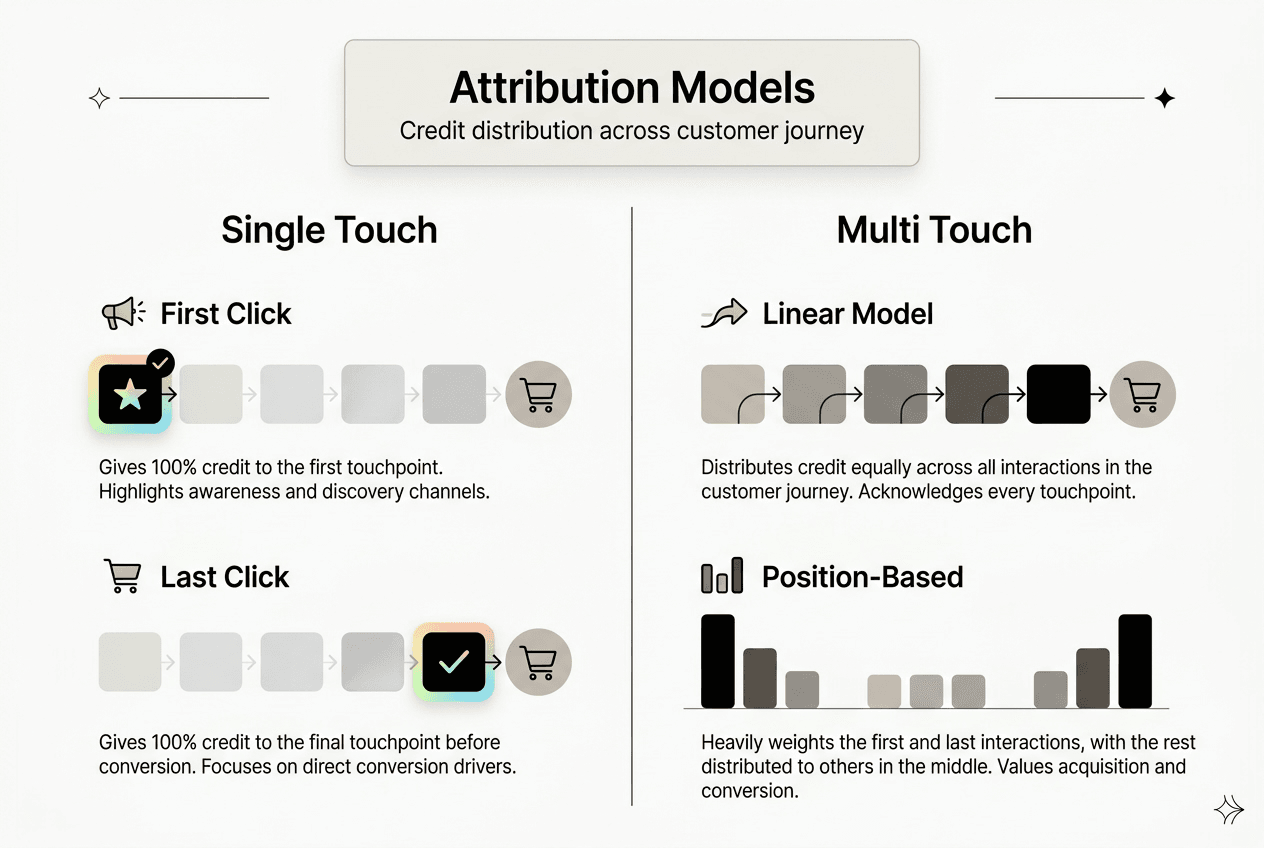
The reality of modern ecommerce: customers interact 5-10+ times across channels before buying. They might see an Instagram ad, click through and browse, leave, receive a welcome email, click that email and add to cart, abandon the cart, get a cart recovery SMS, and finally convert. Last-click credits only the SMS, ignoring six other crucial touches.
| Attribution Model | Credit Distribution | Best For | Limitation |
|---|---|---|---|
| Last-click | 100% to final touch | Simple campaigns, short sales cycles | Ignores awareness and consideration stages |
| First-click | 100% to initial touch | Brand awareness focus | Ignores nurturing and conversion optimization |
| Linear | Equal across all touches | Understanding full journey | Oversimplifies touch importance |
| Time-decay | More to recent touches | Conversion-focused optimization | May undervalue discovery channels |
| Position-based | 40% first, 40% last, 20% middle | Balanced growth strategy | Complex to implement |
Klaviyo analytics provide the data foundation for multi-touch attribution. Every email click, SMS tap, and campaign conversion gets tracked with timestamps and attribution details. Export this data or integrate with attribution platforms to build comprehensive models.
Key benefits of adopting multi-touch attribution:
- Accurately measure ROI across all marketing channels, not just bottom-funnel
- Optimize budget allocation based on true contribution to revenue
- Identify which touchpoint sequences convert best for different customer segments
- Prevent over-investment in last-click channels while starving awareness campaigns
- Understand how email, SMS, and paid ads work together in customer journeys
Smarter resource allocation follows better attribution. If your analysis shows that customers who engage with both welcome emails and retargeting ads convert at 2x the rate of single-channel engagements, you know to coordinate those channels rather than silo them. This insight transforms campaign planning.
Explore more optimization strategies in role of analytics in ecommerce growth.
Boost your analytics with Swyft’s Klaviyo expertise
Tracking analytics correctly demands technical precision and strategic thinking. You’ve learned the mechanics, but implementation challenges still arise. Swyft Interactive specializes in Klaviyo email marketing services that turn tracking data into revenue-generating automation.
We implement custom event tracking, build sophisticated flows triggered by precise customer behaviors, and optimize attribution across your marketing stack. Our email marketing automation guide ecommerce approach combines technical setup with strategic campaign development, ensuring your analytics translate to higher conversions and customer lifetime value.
Whether you need help configuring Klaviyo APIs, designing multi-touch attribution models, or building automated flows that leverage your tracking data, our team delivers proven results. We’ve helped dozens of ecommerce brands transform their analytics from basic reporting into predictive, actionable intelligence that drives growth.
Ready to maximize your Klaviyo investment? Let’s discuss your ecommerce growth strategy automation needs and build a tracking foundation that scales with your business.
FAQ
What is Active on Site tracking in Klaviyo?
Active on Site tracking captures when identifiable browsers visit your website, creating engagement timestamps. You use these events to segment customers by visit recency and frequency. It powers reactivation campaigns and helps identify highly engaged visitors who haven’t converted yet.
How do I use the Klaviyo ‘track’ method for custom event tracking?
Call "klaviyo.track` with an event name string and optional properties object containing relevant data. The method accepts multiple data types including strings, numbers, dates, booleans, and arrays. These custom events then become available as flow triggers and segment filters throughout Klaviyo.
What are the limitations of last-click attribution in ecommerce?
Last-click attribution overvalues bottom-funnel channels while ignoring earlier touchpoints that built awareness and consideration. It fails to capture the complexity of modern customer journeys where buyers interact with brands 5-10+ times across multiple channels. This creates misleading ROI data that can lead to poor budget allocation decisions.
Which ecommerce platforms automatically enable Klaviyo onsite tracking?
Shopify, BigCommerce, Magento, and WooCommerce integrations include automatic onsite tracking for Viewed Product and Active on Site events. Custom platforms or less common carts require manual JavaScript snippet implementation. Always verify tracking in your Klaviyo dashboard after setup, regardless of platform.
How does multi-touch attribution improve marketing ROI?
Multi-touch models reveal how channels work together throughout customer journeys rather than crediting only the final conversion touchpoint. This shows the true contribution of awareness and consideration channels, preventing budget cuts to high-performing top-funnel marketing. You can then optimize spend based on complete journey data rather than incomplete last-click metrics.