
TL;DR:
- A loyalty program email workflow automates behavior-triggered messages, enhancing customer engagement and retention. Proper integration of real-time loyalty data, segmentation, and recurring optimization are essential to boost conversions up to 5.4 times industry rates. Most workflows underperform initially due to poor sequencing, data issues, and lack of cross-team coordination, requiring phased implementation and patience.
A workflow for loyalty program email campaigns is an automated sequence of behavior-triggered emails that moves customers through your loyalty program based on real-time actions, points balances, and tier status. Done right, these sequences deliver 20% higher click-through rates than standard promotional emails. When you stack behavior, personalization, and urgency signals together, click-to-conversion rates reach up to 5.4 times the 2.5% industry baseline. Tools like Klaviyo, BLOY, and Zembula make this level of automation achievable for eCommerce brands at any scale. This guide breaks down the exact tools, sequences, segmentation logic, and optimization tactics you need to build a loyalty email workflow that compounds retention over time.
What tools and data integrations power a loyalty email workflow?
The foundation of any effective loyalty program email strategy is a clean, real-time data connection between your loyalty platform and your email service provider. Without it, you are sending emails with stale points balances and outdated tier statuses, which destroys trust fast.
Here is what your tech stack needs to include:
- Loyalty platform with API or webhook support. Tools like BLOY, Smile.io, or LoyaltyLion push customer data to your ESP the moment a transaction occurs. This means Klaviyo receives updated points totals, tier changes, and redemption events within seconds, not hours.
- Customer profile properties in your ESP. Klaviyo stores loyalty data as custom profile properties, such as "points_balance
,tier_status, andlast_redemption_date`. These fields power dynamic personalization and conditional content rendering inside email templates. - CRM and eCommerce platform integration. Shopify, BigCommerce, and WooCommerce order data feeds purchase history into your loyalty logic. This lets you trigger emails based on spend thresholds, product categories, or purchase frequency.
- Conditional rendering in email templates. Your ESP must support logic blocks that show or hide content based on profile properties. If a member has zero points, the email should not display a “redeem your points” CTA.
- Segment filters tied to live data. Segments built on loyalty properties update automatically when data syncs, so a customer who just hit VIP status moves into the right segment without manual intervention.
Pro Tip: If your store runs on Shopify, use metafields and customer tags to pass loyalty tier and points data directly into Klaviyo flows. This removes the need for a middleware layer and keeps your data pipeline lean.
Real-time sync is non-negotiable. A customer who earns 500 points on Monday should receive a milestone email by Monday evening, not Thursday.
What automated email sequences drive the most loyalty engagement?
The customer engagement email workflow for a loyalty program is built from eight core automated sequences. Each one targets a specific moment in the member lifecycle.
-
Welcome series. Send three emails: immediately upon enrollment, on day 3, and on day 7. The first confirms enrollment and explains how points work. The second highlights the first reward milestone. The third shares a success story or social proof from existing members. This 3-email welcome sequence sets behavioral expectations early and drives first redemptions.
-
Post-purchase points confirmation. Trigger this within one hour of a completed order. Show the points earned, the running balance, and how far the customer is from their next reward. This closes the feedback loop and reinforces the value of buying again.
-
Points expiration reminders. Send at 30 days, 14 days, and 3 days before expiry. Each email increases urgency in tone and specificity. The 3-day email should include a one-click redemption link that applies the reward directly in cart, since one-click redemption reduces drop-off significantly.
-
Near-reward milestone nudges. When a member is within 10 to 15% of a reward threshold, send a targeted push. These are the highest-converting triggers in the entire workflow because the customer already has momentum and just needs a small push.
-
VIP tier progress and status change notifications. Notify members when they are close to upgrading and again when they achieve a new tier. Downgrade warnings, sent 30 days before tier expiry, are equally powerful for re-engagement.
-
Win-back campaigns for dormant members. Trigger after 60 to 90 days of inactivity. Lead with their current points balance and a time-limited bonus offer to reactivate the relationship.
-
Referral reward emails. Send after a successful referral converts. Acknowledge the contribution, confirm the reward, and suggest who else they might refer.
-
Birthday and anniversary emails. Trigger on the member’s birthday or program enrollment anniversary with a bonus points offer. These feel personal and generate strong open rates.
Pro Tip: Layer SMS into your expiration and milestone sequences for members who have opted in. A text message sent two hours before a points expiry deadline consistently outperforms a standalone email for last-minute redemptions.
How to segment loyalty members for higher email relevance

Segmentation is where most loyalty email programs leave revenue on the table. Sending the same email to a first-time member and a VIP who has not purchased in 90 days is a waste of both sends and goodwill.
Build your loyalty member segments around these six behavioral profiles:
- New members (0 to 30 days, no purchase). These members need education, not promotions. Show them how the program works and what the first reward looks like in practice.
- Active earners (regular purchasers, low redemption). These customers earn points but never redeem. Send a “you have enough to claim a reward right now” email with a direct redemption link.
- Almost There. Members within 10 to 15% of a reward threshold. This segment, along with At-Risk VIPs and Program Dormant members, drives the majority of loyalty revenue and deserves the most personalized messaging.
- VIP members. High-spend, high-engagement customers. These members respond to exclusivity, early access, and recognition. Do not send them the same email as a new member.
- At-Risk VIPs. VIPs who have not purchased in 45 to 60 days. A personalized re-engagement email acknowledging their status and offering a tier-protection bonus performs far better than a generic discount.
- Lapsed members. No activity in 90-plus days. These members need a reason to care again. Lead with their dormant points balance and a time-sensitive offer.
The key insight from DataCandy’s 2026 loyalty research is that failing to segment by loyalty behavior is one of the most common and costly mistakes in eCommerce email marketing. Generic blasts suppress engagement metrics and train your audience to ignore your emails.
Pro Tip: Automate segment membership updates daily using your ESP’s integration with your loyalty platform. A customer who makes a purchase today should move from Lapsed to Active Earner by tomorrow morning, without any manual list management.
What are the best practices for optimizing your loyalty email workflow?
Building the workflow is step one. Keeping it performing over months and years requires a disciplined optimization practice.
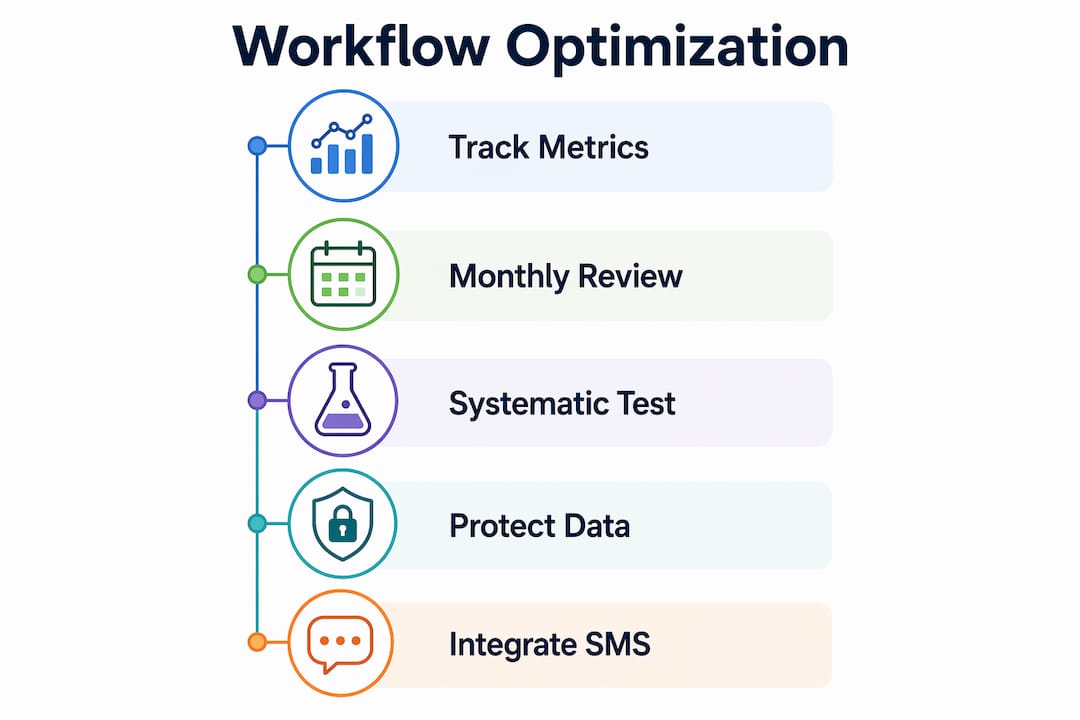
Track the right metrics. Open rates and click-through rates tell you about email performance. Redemption rates tell you about program health. Monitor all three separately. A high open rate with a low redemption rate signals that your CTA or redemption experience has friction, not that your subject lines are failing.
Review workflows monthly, not quarterly. Loyalty program behavior shifts with seasons, promotions, and product launches. A workflow that performed well in Q4 may underperform in Q1 if the incentive structure no longer matches member expectations. Monthly reviews catch these gaps before they compound.
Test systematically. Run A/B tests on subject lines, send times, CTA copy, and points display formats. Test one variable at a time and run each test for at least two weeks to collect statistically meaningful data. Subject line tests are the fastest wins because they affect open rates immediately.
Protect data accuracy. Stale loyalty data in emails, such as an incorrect points balance or a wrong tier label, breaks the customer experience and erodes trust in the program itself. Audit your data sync at least monthly and set up alerts for sync failures.
Avoid training customers to expect discounts. Loyalty emails that lead exclusively with discount offers erode brand margin and condition members to wait for promotions rather than buy at full price. Mix in exclusive access, early product launches, and educational content between transactional triggers. Sending content that educates and connects between purchases builds emotional loyalty that discounts cannot replicate.
Integrate SMS for urgency. Monthly redemption rate monitoring combined with SMS integration for high-urgency triggers, like expiring points, produces measurably better conversion outcomes than email alone.
Pro Tip: Use A/B testing on your near-reward nudge emails specifically. Test whether showing the exact dollar value of the reward outperforms showing the points number. For most audiences, dollar values win because they reduce cognitive load.
Key takeaways
An effective loyalty email workflow requires real-time data integration, behavior-based segmentation, and a structured sequence of automated triggers to convert program members into repeat buyers.
| Point | Details |
|---|---|
| Real-time data sync | Connect your loyalty platform to Klaviyo via API or webhooks to keep points and tier data accurate in every email. |
| Core automated sequences | Build eight flows covering welcome, post-purchase, expiration, milestone, VIP, win-back, referral, and birthday triggers. |
| Behavior-based segmentation | Divide members into six segments including New, VIP, At-Risk VIP, and Lapsed to send relevant messages that convert. |
| Multi-signal email design | Combine behavior, personalization, and urgency in a single email to reach up to 5.4x the industry conversion baseline. |
| Monthly optimization cadence | Review redemption rates, test variables, and audit data sync monthly to prevent workflow decay over time. |
Why most loyalty workflows underperform in the first six months
Most loyalty email workflows fail not because of bad strategy but because of poor execution sequencing. Teams launch all eight flows at once, the data sync is imperfect, and the first batch of emails goes out with wrong points balances or broken redemption links. The damage to member trust is immediate and hard to recover from.
The approach that actually works is a phased rollout. Start with three flows: the welcome series, the post-purchase confirmation, and the points expiration reminder. Get those three working with clean data before adding milestone nudges, VIP notifications, and win-back campaigns. This is not a shortcut. It is how you build a workflow that holds up under real traffic.
The second thing most teams underestimate is cross-functional buy-in. Your loyalty email workflow touches marketing, IT, and customer service simultaneously. When a sync fails and a customer receives an email showing 0 points when they have 2,400, customer service gets the complaint. When IT pushes a platform update that breaks the webhook, marketing does not find out until open rates drop. Building a shared monitoring dashboard and a weekly sync between these three teams is not overhead. It is the infrastructure that keeps the workflow running.
The third lesson is patience with segmentation fidelity. Your “At-Risk VIP” segment will not be accurate on day one. It takes 60 to 90 days of behavioral data before your segments reflect reality. Resist the urge to judge the workflow’s performance before the data has matured. The brands that see the strongest long-term results from their lifecycle email strategy are the ones that commit to a 90-day calibration period before drawing conclusions.
— Leon
How Swyftinteractive can build your loyalty email workflow
Swyftinteractive specializes in designing and implementing eCommerce email automation systems built on Klaviyo, including full loyalty program workflow architecture. If you are ready to move beyond manual campaigns and build a data-driven system that runs automatically, the email marketing automation guide covers the full framework Swyftinteractive uses with eCommerce clients.
For brands that want a done-for-you solution, Swyftinteractive’s Klaviyo email marketing services include loyalty platform integration, custom flow design, segmentation setup, and ongoing performance optimization. The team has built workflows for eCommerce brands across retail, beauty, and apparel, with measurable improvements in redemption rates and customer lifetime value. Book a consultation to see what a properly integrated loyalty workflow looks like for your store.
FAQ
What is a workflow for loyalty program email campaigns?
A loyalty program email workflow is an automated sequence of emails triggered by customer behaviors such as earning points, reaching a tier milestone, or approaching reward expiry. It uses real-time loyalty data to send personalized, timely messages that drive repeat purchases.
How many emails should a loyalty welcome series include?
A 3-email welcome series sent immediately upon enrollment, on day 3, and on day 7 is the recommended structure. The sequence introduces the program, highlights the first reward milestone, and reinforces the value of participation.
Which loyalty email segments generate the most revenue?
The “Almost There,” “At-Risk VIP,” and “Program Dormant” segments drive the majority of loyalty revenue because they target members at high-conversion moments. Personalizing messaging to each segment’s specific status and motivation produces the strongest results.
How do I avoid training customers to expect constant discounts?
Use behavioral triggers to offer exclusive access, early product launches, and recognition rather than leading every email with a discount. Exclusive perks over discounts protect brand margin and build loyalty that holds up between sale periods.
What metrics should I track for loyalty email performance?
Track open rates, click-through rates, and redemption rates as separate KPIs. Redemption rate is the most direct indicator of program health and should be reviewed monthly alongside workflow performance data.