Personalize email flows by wiring real-time behavioral data into dynamic templates, then building your highest-impact flows first: cart abandonment, browse abandonment, welcome, post-purchase, and winback. That sequence, done well, drives the majority of automated email revenue for most ecommerce brands.
Start here — your 1-day sprint checklist:
- Verify your tracking pixel fires on product view, add-to-cart, checkout start, and purchase events
- Connect your product catalog to your ESP so recommendations pull live inventory and pricing
- Build one dynamic template with a fallback for every personalized variable
- Enable send-time optimization for broadcast campaigns only (not event-triggered flows)
- Launch your cart abandonment flow first — a 3-email sequence consistently outperforms a single send
If you only do one thing today, get the pixel firing correctly. Every personalization tactic downstream depends on clean behavioral data reaching your ESP in near real time.
Key Takeaways
Personalized email flows require a validated data layer, dynamic templates, and a phased rollout starting with cart abandonment to generate measurable revenue gains within 90 days.
| Point | Details |
|---|---|
| Start with cart abandonment | A 3-email sequence (30–60 min, 24h, 72h) consistently recovers more revenue than a single send. |
| Data layer first | Pixel, catalog sync, and identity resolution must be validated before any flow goes live. |
| Use 5–7 segments to start | Over-segmentation before data maturity produces noise; expand only when content differs meaningfully. |
| Measure RPR and CTR, not opens | Open rate is unreliable post-privacy changes; revenue per recipient and CTR are your real signals. |
| Swyftinteractive | Offers Klaviyo lifecycle audits and full-stack flow builds to accelerate personalized email programs. |
Table of Contents
- Why personalized email flows outperform generic sends
- What data and integrations do you need first?
- Personalization recipes for your five highest-impact flows
- How to build dynamic content blocks and product recommendations
- What segmentation framework actually works at scale?
- When should you use send-time optimization?
- How to protect deliverability while scaling personalization
- Your 90-day implementation checklist
- Agency-proven rollout plan from Swyft Interactive
- What most teams get wrong about personalization
- Swyftinteractive builds and manages Klaviyo lifecycle programs for ecommerce brands
- Sources
- FAQ
Why personalized email flows outperform generic sends
Generic batch-and-blast emails are measurably less effective than personalized email marketing that uses customer names, past purchases, and behavior-driven product recommendations. The lift shows up across every metric that matters: click-through rate, conversion rate, and revenue per recipient.
Browse abandonment emails sent within the right window achieve open rates of 45%–50%, a figure that reflects how well timed, relevant messages perform when behavioral intent is fresh. That kind of engagement is not achievable with a generic promotional email.
KPIs worth tracking for personalized flows:
- Revenue per recipient (RPR): the clearest measure of flow value; compare across segments
- Conversion rate: purchases divided by delivered emails for each flow
- Click-through rate (CTR): a reliable engagement signal, unlike open rate
- Flow revenue share: what percentage of total email revenue each flow generates
A note on open rate: Privacy changes, including Apple’s Mail Privacy Protection, have made open rate an unreliable deliverability signal. Use CTR, RPR, and conversion rate as your primary health indicators instead.
Klaviyo and Shopify together give ecommerce teams a native path to this kind of data-driven personalization. Klaviyo’s flow builder ingests Shopify purchase and browse events, syncs the product catalog, and lets you render dynamic content blocks per recipient at send time. The five must-run ecommerce flows — welcome, abandoned cart, browse abandonment, post-purchase, and winback — drive the bulk of automated email revenue when personalized correctly.
What data and integrations do you need first?
Real personalization requires a data layer, not just an ESP. A five-component architecture covers the full stack: behavioral event tracking, customer identity resolution, segmentation and personalization logic, product catalog sync, and flow execution.
Events to capture (minimum viable set):
- Product viewed
- Add to cart
- Checkout started
- Order placed / purchase completed
- Email clicked, unsubscribed
- Zero-party preferences (quiz answers, stated interests)
Behavioral signals — browse, cart, purchase, and search — are the highest-value inputs for personalization. Stale signals hurt relevance, so near-real-time sync to your ESP is non-negotiable.
Integration checklist:
| Component | What to configure | Why it matters |
|---|---|---|
| Tracking pixel | Install on all pages; verify event payloads | Captures behavioral intent in real time |
| Server-side events | Webhooks for purchase and refund events | Fills gaps where client-side pixel misfires |
| Product catalog sync | Sync SKU, price, image, inventory status | Powers dynamic product grids and recommendations |
| Identity resolution | Match anonymous web sessions to known profiles | Prevents duplicate profiles and broken flows |
| Shopify integration | Native Klaviyo-Shopify connector | Syncs orders, segments, and catalog automatically |
On privacy: collect only the data you will actually use in a flow. Tell subscribers what you track and give them easy opt-out controls. A single sentence in your preference center (“We use your browsing history to recommend products you’ll love”) goes a long way toward transparency without killing conversion.
Personalization recipes for your five highest-impact flows
Five flows generate the majority of automated email revenue. Here is how to personalize each one.
| Flow | Trigger | Primary signal | Cadence | Goal |
|---|---|---|---|---|
| Welcome | Email signup | Source, stated preferences | Immediately, +24h, +72h | Convert first purchase |
| Abandoned cart | Add-to-cart, no purchase | Cart contents, cart value | 30–60 min, +24h, +72h | Recover sale |
| Browse abandonment | Product view, no add-to-cart | Viewed category/SKU | 2–4 hours, +24h | Re-engage intent |
| Post-purchase | Order placed | Product purchased, order value | +1 day, +7 days, +30 days | Drive repeat purchase |
| Winback | No purchase in 90–180 days | Last purchase date, LTV | +90 days, +120 days | Reactivate or suppress |
Cart abandonment: Send the first email within 30–60 minutes of abandonment while intent is highest. Show the exact cart contents with live pricing and inventory. Follow up at 24 hours with social proof (reviews for the abandoned product), and at 72 hours with a soft incentive if your margin allows. A 3-email sequence consistently recovers more revenue than a single send, with the first email typically accounting for the largest share of recovery.
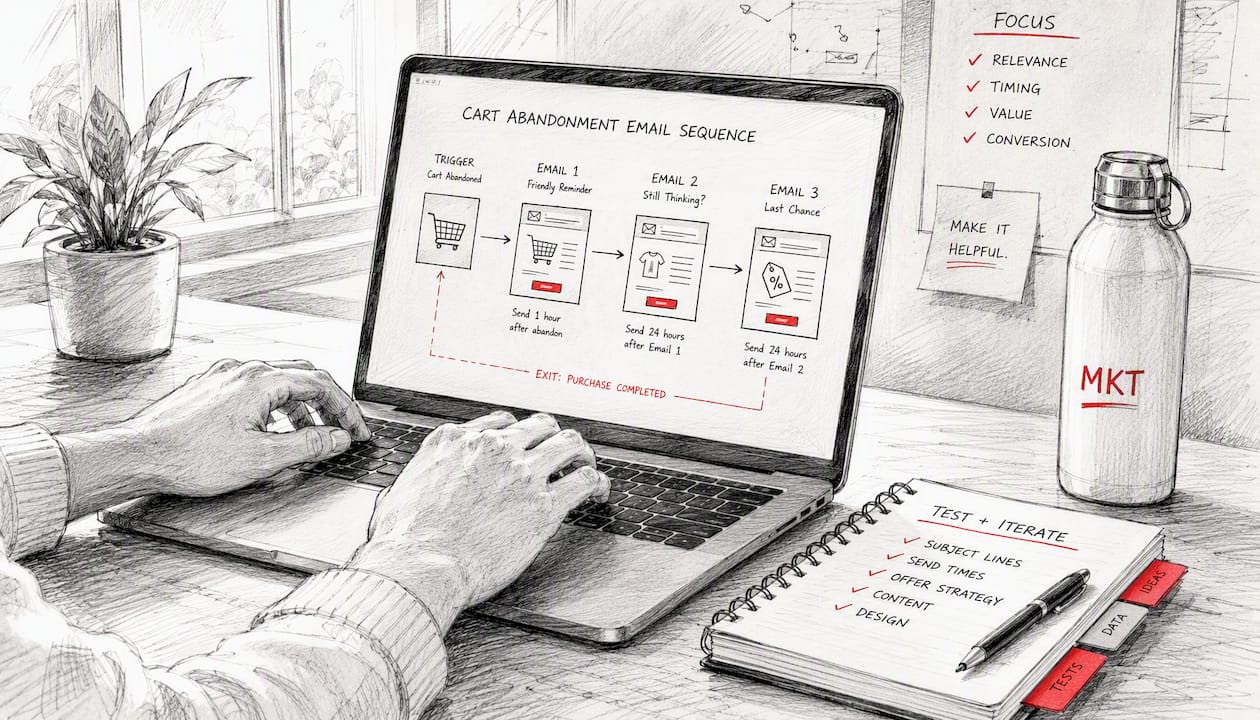
Browse abandonment: Wait a few hours before sending. Show the viewed product plus related items. Segment by category browsed — someone who viewed running shoes gets different copy than someone who browsed kitchen gear.
Welcome: Personalize by acquisition source. A subscriber from a paid social ad for a specific product category gets a different hero image and product grid than someone who signed up through a generic pop-up. Use stated preferences from your sign-up form if you collected them.
Post-purchase: The first email (order confirmation) is the most-opened message you will ever send. Use it to cross-sell complementary products based on what was purchased, not your bestsellers list. At day 7, ask for a review. At day 30, introduce a loyalty program or a replenishment reminder if the product has a natural reorder cycle.
Winback: Segment by customer value before sending. Higher-value lapsed customers get a personal-feeling subject line and a meaningful offer. Lower-value lapsed subscribers get one re-engagement attempt, then suppression. Sending to chronically unengaged addresses hurts deliverability for everyone else on your list.
Pro Tip: For abandoned cart, exclude anyone who purchased between the trigger and the first send. A customer who completed checkout on mobile while your email was queuing should never receive a cart recovery message.
How to build dynamic content blocks and product recommendations
Static email templates cap your personalization ceiling. Dynamic content blocks, where the ESP selects and renders content per recipient at send time, remove that ceiling entirely.
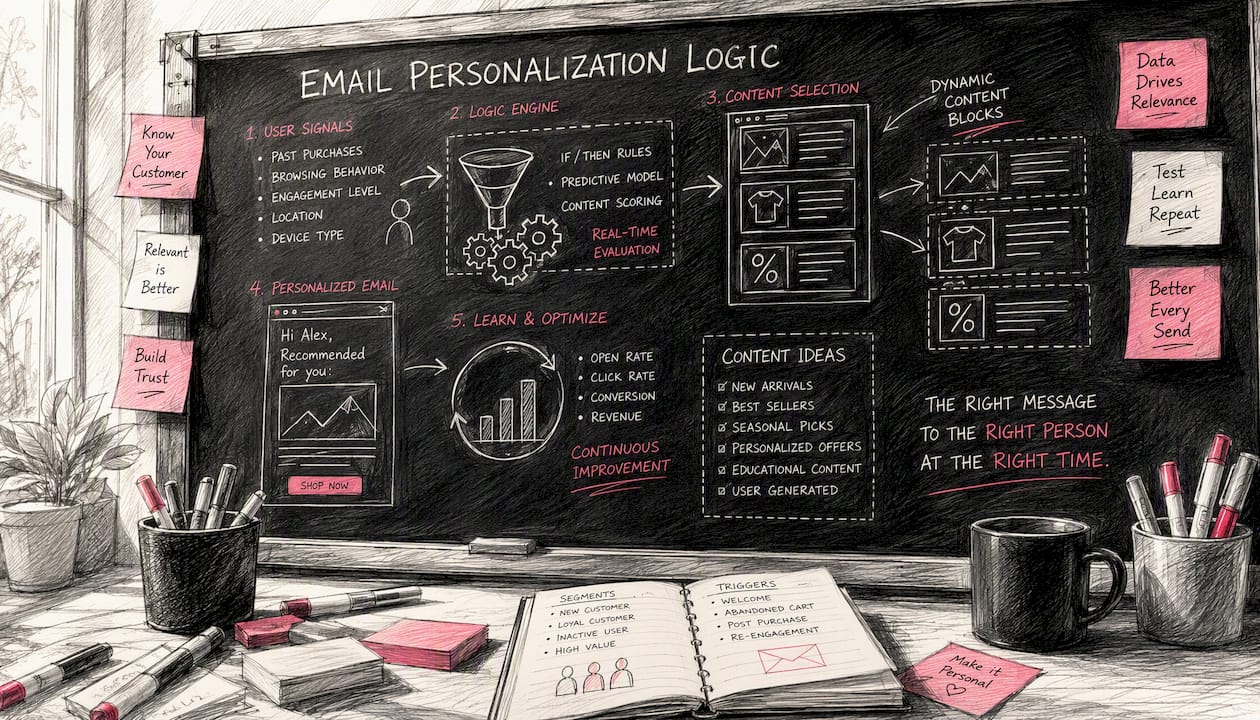
AI-based personalization stacks replace static blocks with AI-selected content chosen at send time. The system can swap hero images, product grids, and CTAs per recipient and improve its selections over time as it accumulates engagement data.
Recommendation approaches and when to use each:
- Collaborative filtering: “Customers like you also bought.” Works well once you have enough purchase history (typically 1,000+ orders). Best for post-purchase and winback flows.
- Content-based filtering: Recommends items similar to what the customer viewed or bought. Works with smaller catalogs and less data. Good for browse abandonment and welcome flows.
- Business-rule hybrids: Override the algorithm for margin, inventory, or promotional reasons. Always layer business rules on top of algorithmic recommendations, not instead of them.
Dynamic block patterns to implement:
- Show/hide logic based on purchase history (first-time buyer vs. repeat buyer)
- Hero image swap based on browsed category
- Product grid populated from catalog sync (live price and inventory)
- CTA text variation based on loyalty tier or cart value
Testing plan: A/B test one variable at a time. Start with block position (product grid above vs. below the hero), then test algorithm variant (collaborative vs. content-based), then number of recommended items (three vs. six). Measure lift in CTR and RPR, not open rate.
Catalog fields required for real-time selection: SKU, product title, price, sale price, image URL, category, inventory status, and product URL. Missing any of these causes rendering failures or broken links in dynamic blocks.
What segmentation framework actually works at scale?
Start with 5–7 high-impact segments. Over-segmentation is one of the most common operational mistakes: teams build 40 segments, then cannot produce meaningfully different content for each one, and the whole system collapses under its own complexity.
Practical starting segments:
- New subscribers (no purchase, joined within 30 days)
- First-time buyers (one purchase, within 60 days)
- Repeat buyers (two or more purchases)
- High-LTV customers (top 20% by lifetime spend)
- At-risk customers (purchased before, no activity in 60–90 days)
- Unengaged subscribers (no click in 90+ days, never purchased)
- VIP / loyalty members (enrolled in loyalty program)
Klaviyo’s ecommerce segmentation framework emphasizes RFM analysis (recency, frequency, monetary value), purchase-driven exclusions, and zero-party data as the pillars of revenue-effective segmentation. RFM tiers let you identify your best customers and your most at-risk ones without building a machine learning model.
Predictive signals worth layering in once you have volume:
- Predicted next purchase date (prioritize timing of post-purchase flows)
- Churn risk score (trigger winback earlier for high-LTV at-risk customers)
- Predicted lifetime value (decide incentive depth for winback)
The operational rule: start rule-based, layer prediction later. Rule-based segments are transparent, debuggable, and work with limited data. Predictive models need consistent behavioral data and meaningful flow volume before their outputs are reliable. Trying to run predictive personalization on a list of 2,000 subscribers with sparse purchase history produces noise, not signal.
Pro Tip: Build your segmentation strategy around the content you can actually produce. A segment is only useful if you can send it something meaningfully different from what everyone else receives.
When should you use send-time optimization?
Send-time optimization (STO) analyzes each subscriber’s historical open and click patterns to predict the best delivery window for that individual. It works well for broadcast campaigns where the content is time-insensitive.
For event-triggered flows, trigger timing beats STO every time. A cart abandonment email delayed by four hours because STO predicted a better open window at 9 PM will underperform an email sent 45 minutes after abandonment, even if the open rate is marginally higher. Intent decays fast.
Cadence rules for common flows:
- Cart abandonment: 30–60 minutes, 24 hours, 72 hours
- Browse abandonment: 2–4 hours, 24 hours
- Welcome: immediately on signup, 24 hours, 72 hours
- Post-purchase: 1 day, 7 days, 30 days
- Winback: 90 days, 120 days (then suppress if no engagement)
STO caveats: Most platforms require 30 days of engagement data before STO predictions are reliable. New subscribers and low-engagement profiles default to a fallback send window. Do not apply STO to flows where timing is the primary conversion lever. Apply it to newsletters and promotional campaigns where a one-to-two hour shift in delivery does not change the message’s relevance.
One thing to avoid: building abandonment flow timing around historical open patterns. Someone who typically opens email at 8 AM should still receive a cart abandonment email within an hour of abandoning, not the next morning.
How to protect deliverability while scaling personalization
Personalization at scale creates deliverability risk if you are not managing exclusions and list hygiene in parallel. More flows mean more sends, and more sends to unengaged addresses means more spam complaints.
Smart exclusions to build into every flow:
- Exclude recent purchasers from cart and browse abandonment flows (purchase window: 24–48 hours)
- Suppress anyone who unsubscribed or hard-bounced
- Exclude soft-bounce addresses after three consecutive bounces
- Remove high-volume unengaged addresses (no click in 180+ days, never purchased) from all flows
- Suppress active purchasers from winback flows
List hygiene checklist:
- Authenticate your sending domain with SPF, DKIM, and DMARC records
- Monitor spam complaint rate (keep below 0.1% per send)
- Run engagement-based sending: start with your most engaged segment, expand gradually
- Review suppression lists monthly and remove addresses that have re-engaged
- Use double opt-in for new subscribers when deliverability is a concern
Personalization using customer names, past purchases, and behavior-driven recommendations increases relevance and CTR, which in turn signals to inbox providers that your mail is wanted. Relevant mail gets delivered; irrelevant mail gets filtered.
Open rate is no longer a reliable list health signal. Privacy changes have inflated open rates artificially. Use CTR, RPR, and conversion rate to make suppression and re-engagement decisions instead.
Your 90-day implementation checklist
Build in this order. Skipping steps creates technical debt that breaks personalization downstream.
- Data audit — inventory which events fire, which are missing, and which profile properties exist in your ESP
- Pixel install and validation — verify all five core events fire with correct payloads; use your ESP’s event stream to confirm
- Catalog sync — connect your product feed; confirm SKU, price, image, and inventory fields populate correctly
- Identity resolution — test that anonymous sessions merge with known profiles on email capture
- Suppression rules — build exclusion logic before any flow goes live
- Dynamic templates — build one template per flow with fallback copy for every variable
- Staging sends — send test emails to seed addresses covering every segment variant
- QA checklist — verify variable rendering, fallback logic, product grid links, and mobile display
- Launch cart abandonment first — it has the highest ROI and the clearest success signal
- Expand to remaining flows — welcome, browse, post-purchase, winback in priority order
| Phase | Days | Focus | Owner |
|---|---|---|---|
| Foundation | 1–30 | Pixel, catalog, identity, suppression | Engineering + Email |
| Core flows | 31–60 | Cart, welcome, browse abandonment live | Email team |
| Optimization | 61–90 | Post-purchase, winback, A/B tests, RPR review | Email + Analytics |
Measurement timeline: In the first 30 days, watch CTR and flow entry rates to confirm events are firing and templates are rendering. From day 31 to day 90, shift focus to RPR and conversion rate per flow. Revenue per recipient is the number that tells you whether personalization is actually working.
Agency-proven rollout plan from Swyft Interactive
A phased rollout reduces risk and surfaces data quality issues before they contaminate live flows.
Phase 1 (Days 1–30): Foundation
Engineering installs and validates the pixel, connects the catalog, and confirms identity resolution. Marketing builds suppression rules and drafts dynamic templates. Analytics sets up flow-level revenue tracking.
Phase 2 (Days 31–60): Core flows live
Cart abandonment launches first. It is followed by welcome and browse abandonment. The email team monitors entry rates, rendering, and suppression logic daily for the first two weeks. An expected early signal is the cart recovery rate and CTR on browse abandonment.
Phase 3 (Days 61–90): Optimization and expansion
Post-purchase and winback flows launch. A/B tests begin on recommendation algorithm variants and incentive depth. Analytics reviews RPR by segment and flow. Predictive segments layer in where data volume supports them.
Realistic improvement ranges from agency practice: brands that move from no personalization to a validated 3-flow setup typically see meaningful gains in RPR and conversion rate within the first 60 days, with the largest share coming from cart abandonment. These are directional benchmarks based on agency experience, not guaranteed outcomes — results vary by catalog size, list quality, and traffic volume.
What most teams get wrong about personalization
The conventional wisdom says more personalization is always better. After running Klaviyo lifecycle programs across multiple ecommerce brands, the pattern I see most often is the opposite problem: teams over-engineer the segmentation before they have the data to support it, and under-invest in the suppression rules that protect everything else.
Three things teams consistently miss:
Over-segmentation before data maturity. Building 30 segments on a list of 5,000 subscribers means most segments have too few members to generate statistically meaningful results. Start with 5–7 segments and expand only when you can deliver genuinely different content for each one.
Missing suppression rules at launch. Sending a cart abandonment email to someone who purchased 20 minutes ago is not just irrelevant — it erodes trust. Suppression logic should be built before the first flow goes live, not added after the first complaint.
Training subscribers to wait for discounts. Brands that put a coupon in every third email in a welcome series teach their list to hold off on purchasing until the code arrives. Use a one-time welcome incentive or a non-discount value add (free shipping, early access, exclusive content) instead of recurring codes that condition discount-dependent behavior.
The email automation benefits are real, but they compound only when the foundation is clean. A well-suppressed list with three tight flows outperforms a sprawling 15-flow setup built on a leaky pixel every time.
Swyftinteractive builds and manages Klaviyo lifecycle programs for ecommerce brands
If you have read this far, you know what good personalization requires: a clean data layer, dynamic templates, tight suppression rules, and a phased rollout that prioritizes revenue-dense flows. Building that from scratch takes time your team may not have.
Swyftinteractive specializes in exactly this work: Klaviyo lifecycle audits, full-stack flow builds, catalog integrations, and ongoing flow management for ecommerce brands. The audit identifies what is broken in your current setup, what is missing, and which flows to build first. The build phase delivers validated, personalized flows with suppression logic and dynamic templates already in place.
The next step is a Klaviyo lifecycle audit and strategy session — a structured engagement that maps your current data layer, scores your existing flows, and delivers a prioritized build plan. If you want to see the full automation framework before booking, the email marketing automation guide covers the complete system.
Sources
- Klaviyo
- AI Email Personalization at Scale | EmailCloud
- Automate Personalized Email Flows: 5 Steps Guide | US Tech Automations
- How ecommerce brands can use behavioural data to improve email marketing personalisation – IntelligentHQ
- Ecommerce email marketing flows (2026) – EshopPick
FAQ
How do I personalize my emails without a developer?
Platforms like Klaviyo include native dynamic content blocks, conditional logic, and catalog sync that require no custom code. Start with merge tags for name and product variables, then add show/hide logic based on purchase history as you grow comfortable with the template editor.
How do I set up email flows for an ecommerce store?
Connect your ecommerce platform (Shopify integrates natively with Klaviyo), install the tracking pixel, sync your product catalog, and build flows in priority order: cart abandonment first, then welcome, browse abandonment, post-purchase, and winback. Validate suppression rules before any flow goes live.
What is the 3-email rule for abandoned cart flows?
A 3-email cart abandonment sequence — sent at 30–60 minutes, 24 hours, and 72 hours after abandonment — consistently recovers more revenue than a single send. The first email typically accounts for the largest share of recovery, so timing and relevance in that message matter most.
How do you automate personalized emails at scale?
The foundation is a five-component stack: behavioral event tracking, identity resolution, segmentation logic, product catalog sync, and flow execution in your ESP. Once those are in place, dynamic templates and conditional content blocks handle per-recipient personalization automatically at send time.
What metrics should I track for personalized flows?
Track revenue per recipient, conversion rate, and click-through rate per flow. Open rate is unreliable as a primary signal due to privacy changes that inflate it artificially. Compare RPR across segments to identify where personalization is generating the most lift.